Supplier portal

A supplier portal in your name, from onboarding to payment.

Unibuild’s supplier portal lets merchants, hire firms and service suppliers onboard themselves and keep their own details and bank account up to date. They upload price lists and invoices, and see where each invoice stands, through to paid. Every bank detail change is validated and approved by your office before it is used.

Two men in an office reviewing documents together at a laptop
One new supplier

A new merchant account, opened properly in an afternoon.

A new electrical wholesaler for a specialist contractor. The supplier and timings are illustrative; the steps are the ones Unibuild runs.

One supplier onboarded through the portal (illustrative)
StepWhoUnibuild
InviteBuyerOnboarding link emailed
CompleteSupplierCompany, contacts, bank, insurance entered
AlertNobodyAccounts told a new supplier is waiting
CheckAccountsBank details validated, documents read
ApproveFinance directorSupplier approved by name
Price listSupplierUploaded on the portal
First orderSite managerRaised from the catalogue at the agreed price
Invited
The buyer sent the wholesaler an onboarding link from Unibuild, with the firm’s own name and logo on it.
Completed
The wholesaler entered its own company details, VAT number, contacts and bank account, and uploaded its insurance certificate.
Checked
Accounts were alerted, the bank details were validated and the documents went on the supplier record with their expiry dates.
Approved
The finance director approved the new supplier. Only then could an order be raised against it.
Trading
The wholesaler uploaded its price list, and the site manager ordered from it the same afternoon, on the phone, at the agreed price.
The rule The supplier enters it, your office approves it Nobody types bank details from an email
Problems we solve

Six supplier management problems. All six solved.

From the bank details changed by email to the supplier who rings every week about payment.

6/6Solved in one module
Book a demo →
Solved

Bank details updated on the strength of an email

What goes wrong

An email that appears to come from a regular supplier gives new bank details. Somebody in accounts updates the record.

The next payment goes to a fraudster, and the supplier is still owed.

How Unibuild solves it

In Unibuild, suppliers keep their bank details on the supplier portal. A change is validated and goes through an approval route before any payment uses it.

A change requested by email has nowhere to go.

  • Kept by the supplier
  • Validated
  • Approved before use

See a supplier onboarded through your own portal in a 30-minute demo.

Solved

New suppliers set up by whoever answers the phone

What goes wrong

A site manager needs a new merchant today. The details are taken over the phone and typed in later.

Half the record is missing, and nobody checked the company exists.

How Unibuild solves it

The supplier receives an onboarding link and enters its own company details, contacts, bank account and documents.

The office is alerted, checks it and approves the supplier before the first order.

  • Onboarding link
  • Supplier enters it
  • Approved before ordering

See a supplier onboarded through your own portal in a 30-minute demo.

Solved

Insurance and accreditations nobody rechecks

What goes wrong

Insurance was checked when the account was opened, two years ago.

Nobody knows which suppliers are still covered.

How Unibuild solves it

Insurance and accreditation documents sit on the supplier record with their expiry dates. Suppliers upload renewals on the portal.

Expiry dates are checked every night, and a supplier with an expired document is flagged and taken off approved status.

  • Documents on the record
  • Renewals uploaded
  • Checked nightly

See a supplier onboarded through your own portal in a 30-minute demo.

Solved

Orders raised from a price list nobody updated

What goes wrong

The agreed price list is a PDF from last spring. Orders go out at the old price and every invoice is a query.

Or orders go out with no price at all.

How Unibuild solves it

Suppliers upload price lists and catalogues on the portal, or the office imports them in bulk.

Buyers order from the approved catalogue at the agreed price, and can request a price from a supplier by email.

  • Price lists uploaded
  • Approved catalogue
  • Price requests by email

See a supplier onboarded through your own portal in a 30-minute demo.

Solved

An accounts phone answering the same question

What goes wrong

A supplier cannot see whether an invoice arrived, was approved or is in a payment run.

So they ring, and somebody looks it up.

How Unibuild solves it

On the supplier portal each supplier sees its own invoices: received, approved, queried, in a payment run or paid.

Each remittance advice is there too, and emailed when the run is paid.

  • Invoice status
  • Remittances
  • Fewer calls

See a supplier onboarded through your own portal in a 30-minute demo.

Solved

A supplier list nobody trusts

What goes wrong

The same merchant appears three times with three spellings and two bank accounts.

Spend by supplier is impossible, and a payment can go to an old account.

How Unibuild solves it

Each supplier is one record, onboarded once, with its details kept current by the supplier itself.

Spend by supplier is a figure you can negotiate with, and bulk updates are made in one action.

  • One record each
  • Kept current
  • Spend by supplier

See a supplier onboarded through your own portal in a 30-minute demo.

What it does

Supplier management software, run by your suppliers.

Supplier
onboarding

New suppliers complete their own onboarding from a link, in your name, and the office approves them before the first order.

  • Company and VAT details
  • Contacts and addresses
  • Bank account
  • Insurance and accreditations
Set up properly onceLive

Bank detail
validation

Bank details are entered by the supplier, validated, and approved by your office before any payment uses them.

  • Entered by the supplier
  • Validated
  • Changes approved
  • Mismatched invoices flagged
Bank changes approved firstLive

New supplier
alerts

The office is told the moment a new supplier is waiting, so due diligence happens before anybody orders.

  • Email and push alerts
  • Microsoft Teams alerts
  • Approval route for new suppliers
  • Every check on record
Due diligence firstLive

Self-service
updates

Suppliers keep their own contacts, addresses and documents up to date, so the record stays right without the office chasing.

  • Contacts and addresses
  • Renewed insurance uploaded
  • Bank changes approved
  • Bulk updates by the office
A list you can trustLive

Price lists
and catalogues

Suppliers upload price lists and catalogues, or the office imports them in bulk, and buyers order at the agreed price.

  • Uploaded by the supplier
  • Bulk catalogue imports
  • Approved catalogue for buyers
  • Price requests by email
The agreed price, every orderLive

Orders
received

Approved purchase orders reach the supplier by email and on the portal, with the job, delivery address and agreed prices.

  • Emailed automatically
  • On the portal
  • Recurring orders too
  • As a PDF or a data file

Invoices
uploaded

Suppliers upload invoices and credit notes on the portal, or email them to your invoice address. Either way they are read and matched.

  • Portal upload
  • Or your invoice address
  • Read and matched
  • Credit notes too

Status and
remittances

Each supplier sees where every invoice stands and every remittance advice, without ringing the accounts office.

  • Received and approved
  • Queried, with the reason
  • In a payment run
  • Paid, with the remittance
Fewer calls about paymentLive

Supplier
register

One record per supplier, with documents, prices, orders, invoices, payments and spend in one place.

  • One record each
  • Expiry checked nightly
  • Spend by supplier
  • Email suppliers from it
Buying you can negotiate onLive
The process

How to onboard a supplier properly.

Six stages from the invitation to a supplier you can trade with and keep current. Free to use in your own procedures.
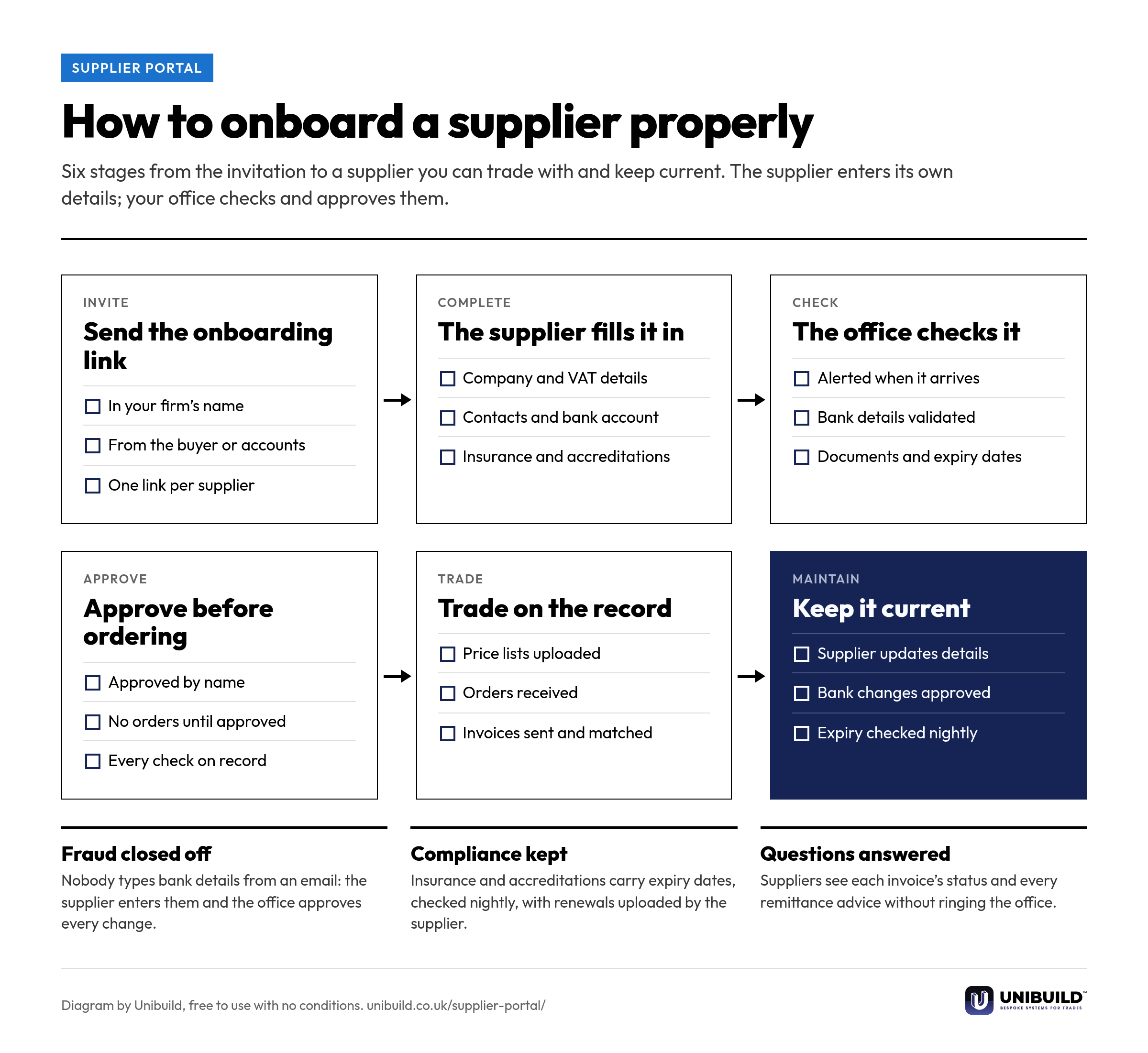
Flow diagram of supplier onboarding in six stages: send the onboarding link, the supplier fills it in, the office checks it, approve before ordering, trade on the record, and keep it current
How to onboard a supplier properly: six stages from the invitation to a supplier record kept current.Free to use, copy, change and share, with no conditions. Download the PNG
Spreadsheet against portal

Supplier onboarding, managed two ways.

Supplier management: email and a spreadsheet compared with the Unibuild supplier portal
The questionEmail and a spreadsheetUnibuild supplier portal
A new supplierDetails taken over the phoneEntered by the supplier, approved by the office
Bank detailsTyped from an emailEntered by the supplier, validated, approved
InsuranceChecked onceExpiry checked every night
PricesLast year’s PDFUploaded price lists and an approved catalogue
InvoicesEmailed to whoeverUploaded or sent to one address, read and matched
“When will we be paid?”A phone callOn the portal, with the remittance
Built around your firm

Your suppliers, your checks,
your name on it.

The supplier portal carries your company’s name and logo, and asks for the details your due diligence needs. Any change you ask for is built for you, inside the monthly fee. That is how bespoke software works here.

Your checks
The details, documents and approvals a new supplier needs are set by you, and differ by supplier type if you want.
Your subcontractors
Subcontractors have their own subcontractor portal for their subcontract orders and invoices.
Your payments
Invoices flow into payment runs and remittance advice in accounts payable automation.
Your approvals
New suppliers and bank changes follow routes set in approval workflows.
Your site team
Orders are raised in your own branded staff app, published on the App Store and Google Play under your company’s name and icon.
No logins to buy
Supplier logins, like every other user, are unlimited and part of the one monthly figure.
A person in an orange hi-vis vest pointing at drawings beside a laptop and a white hard hat
Questions

Asked by accounts, buyers
and finance directors.

What is a supplier portal?
A secure website where your suppliers deal with you directly: onboarding, keeping their details current, receiving orders, sending invoices and seeing payments. Unibuild’s supplier portal carries your firm’s name and logo.
How does supplier onboarding work?
You send the supplier an onboarding link. They enter their company details, VAT number, contacts and bank account and upload their documents. Your office is alerted, checks the details and approves the supplier before the first order can be raised.
How does it protect against bank detail fraud?
Bank details are entered by the supplier on the portal, validated, and approved by your office before they are used. An invoice carrying different bank details is flagged before payment.
Can suppliers update their own details?
Yes. Suppliers keep their contacts, addresses and documents up to date themselves. Bank changes go through an approval route first, and the office can also make bulk updates in one action.
Can suppliers upload price lists and catalogues?
Yes. Suppliers upload price lists on the portal, or the office imports catalogues in bulk. Buyers then order from the approved catalogue at the agreed price, and can request a price from a supplier by email.
Can suppliers see whether they have been paid?
Yes. Each supplier sees its own invoices as received, approved, queried, in a payment run or paid, with every remittance advice. Suppliers see nothing of anybody else’s.
Are we told when a new supplier signs up?
Yes. The office is alerted by email, by push notification or in Microsoft Teams, so due diligence is done before anybody orders.
Are supplier insurance documents checked?
Yes. Documents sit on the supplier record with their expiry dates, which are checked every night. A supplier with an expired document is flagged and taken off approved status until the renewal is uploaded.
What is the difference between the supplier portal and the subcontractor portal?
The supplier portal is for merchants, hire firms and service suppliers. The subcontractor portal is for subcontractors: their subcontract orders, their invoices and what has been paid against each. Both are in your name and both are included.
What is the best supplier management software for UK trade businesses?
One where the supplier record connects to orders, invoices and payments, not a separate list. Unibuild’s supplier portal handles onboarding, validated bank details, price lists, orders, invoices and remittances. Unibuild is bespoke business software for UK trades and specialist contractors, in daily production since 2016.
Is there a charge per supplier or per login?
No. There is no cap on suppliers and no charge per login. One monthly figure covers everything, fixed for three years.
Further reading

Checking who you are trading with, on both sides of the ledger.

Ask for a quote

Tell us a little about the firm.
We do the rest.

Two minutes. A written figure by email, usually the same working day. Unlimited users, so every buyer, approver and supplier login is included.

Headcount
Areas of interest
Get a quote
One figure per firm · For UK firms

Right, let’s talk numbers.

Five things about your business. We work your fee out properly and put it in writing the same working day.

What we build for you

  • Your own portalIn the browser, built around your firm
  • Your own appiOS and Android, under your name
  • Everyday AI includedHeavier AI at cost, nothing added
  • One platformEverything in one place, set up by us

Would you rather see it running first? Book a 30-minute demo

Quotation request