The van waits at the counter while somebody rings the office.
Solved A purchase request from the phone, approved from a push notification.

Unibuild’s expense management lets site workers ask for small purchases in the staff app, get approval from the office and claim the cost back with a photograph of the receipt. It runs beside the standard purchase order workflow, under a spending limit the firm sets.

An example from one job. The amounts are illustrative; the steps are the ones Unibuild runs.
| Payment method | Claims | Total |
|---|---|---|
| Company card | 23 | £1,146.20 |
| Worker’s own card | 14 | £612.75 |
| Cash | 6 | £94.10 |
| Credit account with the supplier | 9 | £703.60 |
| All methods | 52 | £2,556.65 |
From the van waiting at the counter to the fixings that never reached the job’s cost.
Solved A purchase request from the phone, approved from a push notification.
Solved The receipt is photographed at the counter and becomes the claim.
Solved Every claim follows an approved request, so the office says yes before the money goes.
Solved A spending limit set by the firm, and nothing above it can be claimed.
Solved Every claim in one office queue, and the worker notified when it is processed.
Solved The payment method on every claim, and reports by each one.
Solved Approved claims land on the job, with the receipt behind them.
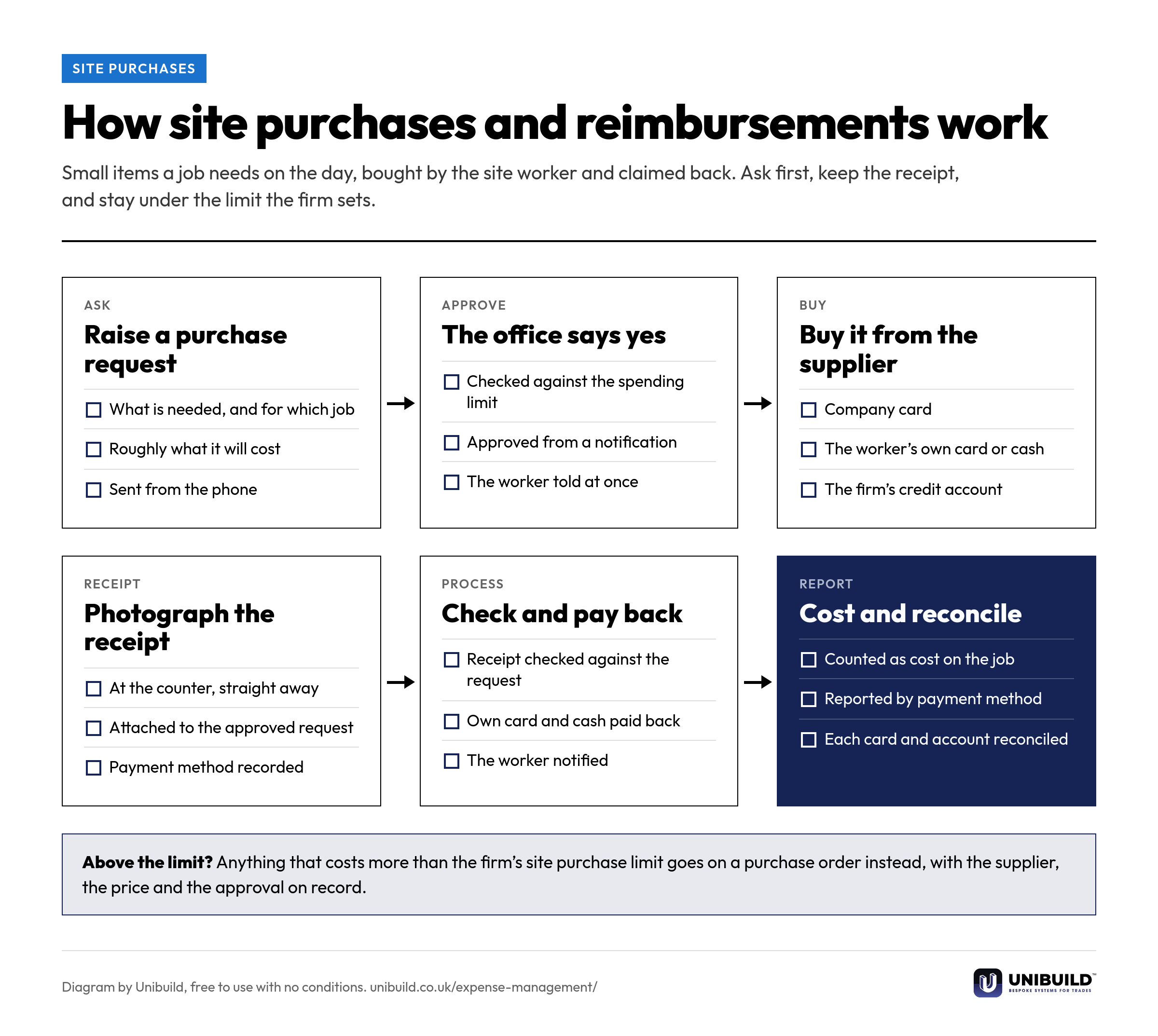
The site worker asks for what the job needs in the staff app, against the job, before buying anything.
The office admin gets a push notification and approves or declines, wherever they are.
After buying, the worker photographs the receipt and the reimbursement claim is raised from the approved request.
The firm sets a cap on what a site worker can buy themselves, and nothing above it can be claimed.
Every purchase request and reimbursement claim in one place, each with its job and its receipt, ready to process.
Spending reported by how it was paid, so each card, the cash and every supplier account can be reconciled.
Six stages from the request on site to the reconciled card statement. Free to use in your own expenses policy.
Most buying in Unibuild runs through purchase orders. Site purchases and reimbursements are an additional route, switched on for firms whose teams need small items on the day.

| The question | Phone calls and paper receipts | Unibuild |
|---|---|---|
| Asking | A call to somebody who is driving | A purchase request in the staff app |
| Approval | A yes nobody wrote down | Approved from a push notification, on record |
| The receipt | In an envelope at month end, if at all | Photographed at the counter |
| The limit | Whatever the worker thinks is reasonable | A cap the firm sets, enforced on every claim |
| How it was paid | Unknown until the statement arrives | Recorded on every claim and reported by method |
| Paying the worker back | When somebody gets round to it | Processed from one queue, with the worker notified |
| The job’s cost | Left in overheads | On the job, with the receipt behind it |
Site purchases are set up the way your firm already buys, and any change you ask for is built for you. Changes after go-live are included in the monthly fee. That is how bespoke software works here.
Trades where a job regularly needs something that is not in the van.
Same platform, same login. These are the modules that price the work, buy for it, measure it, claim it and collect it.
Small purchases are one of several costs that never reach the job. These go further into the rest.
A 30-minute live demo of a site purchase, from the request on the phone to the cost on the job.
Two minutes. A written figure by email, usually the same working day. Unlimited users, so every site worker who buys for a job is included.
UK-built · CDM · CIS · MTD