
SME Building Services:
every job on record.
SME Building Services is a mechanical, electrical and air conditioning contractor in Croydon, specialising in commercial refurbishment in occupied buildings. Site time records, purchase orders, inspections and a client portal have run on Unibuild since 2023.
Published by Unibuild · Updated · Sources

Commercial refurbishment,
in occupied buildings.
SME Building Services is a building services contractor in Croydon. It designs, installs and commissions mechanical, electrical and air conditioning systems, certifies them, and maintains them for years afterwards.
Their speciality is commercial refurbishment in occupied buildings: offices, retail units, schools and healthcare premises that stay heated, lit and in use while the work goes on around them. University College London Hospital is on their project list.
Much of this work requires a traceable inspection or service record: a gas safety record, an electrical test, a fire door inspection, a service sheet. When a client asks whether door B-64 was checked, the record has to be retrievable on the day they ask.
The work and the records it needs
- Services
- Mechanical, electrical and air conditioning
- Project work
- Design, installation, commissioning and refurbishment
- Ongoing work
- Testing, certification and maintenance
- Site records
- Time entries, purchase requests, inspections and photographs
- Client access
- A portal for the records made available to each client
Landmark sites SME
has worked on.
- National infrastructureNational Grid substations, thirteen sites
- Data centreGlobal Switch, East India Dock
- Higher educationKingston University, Kingston Hill and Seething Wells
- JusticeHMP Grendon, Aylesbury
- JusticeHMP Pentonville
- HealthcareBerrywood Hospital, Northampton
Accreditations and
other marks.
Selected marks shown on SME Building Services’s own website, checked 10 September 2026.







Five reasons to connect
the site and the office.
These are examples of recordkeeping risks that the configuration addresses.
Friday afternoon, filling in the pad from memory
When hours are written up from memory and then retyped, the office has to resolve missing entries and job references. A site time record can capture the job and timestamp at the point of entry.
Permission to buy, with no record to follow
A verbal approval at a merchant’s counter can leave no record of the approver, intended purchase or job. A purchase request gives those details a place to be recorded and checked.
The invoice nobody could place
An invoice without an order reference is harder to assign and check. Linking it to an order lets the office compare the supplier’s charge with what was requested for the job.
An insurance renewal that needs checking
A recorded certificate expiry date needs a follow-up process. A nightly status check flags an expired record.
"I'll find out and ring you back"
If an inspection photograph lives only in a camera roll, finding it depends on the person who took it. Attaching evidence to an asset record makes it easier for authorised users to retrieve.
Four things it does every single week.
There is a great deal more in there. These four explain the site-to-office workflow described in this study. Each one has a page of its own if you want the detail.
The day starts with a scan, not a pad
There is a printed code on a poster at the site gate. An operative opens the app, scans it, takes the photograph it asks for, and that is them on the clock, on the right job. The hours are against the job from the poster before anybody types a thing.
How timesheets workA purchase request goes to a named approver
The driver at the counter raises the order on his phone. A named approver receives the request. Only then is an order number issued. When the invoice turns up four weeks later it already knows which order and which job it belongs to.
How purchase orders workThe evidence is written in front of the thing
Inspections are filled in standing at the asset, not back at the van. The photographs and the signature attach to that record rather than to a camera roll, so the fire door, its history, its photographs and the name of whoever signed it are linked in the same system.
How certification worksThe client looks it up themselves
Their customers have their own login. Registers, certificates and approved photographs are there whenever they want them, at any hour, without ringing anybody. The portal provides a self-service route for those records.
How the client portal worksSME Smartsites,
across the whole firm.
The four above are the core of the site-to-office loop. SME’s engineers, office and clients use a good deal more, all under the SME name on iPhone and Android. These six are used every week.
Call-outs from the first call to the invoice
A call-out is logged at any hour and assigned to an engineer, who is alerted on the phone. Photographs, video, hours and materials are added on site, and the resident signs a copy without prices. The office then prices it and raises the invoice.
How reactive work runsDay works signed before and after
The client’s representative signs extra work before it starts and again when it is complete, with start and finish times, the trade of each person and photographs. The operative never sees a price. The office prices it and claims it in the monthly valuation.
How day works and variations workMaintained assets with a label on each
Each maintained asset carries a QR label. The engineer scans it to open the asset, its maintenance schedule, its service history and its SFG20 task. One gas safety record covers every appliance on the visit, each added by scanning its label.
How maintained assets workFire doors located on the drawing
Every fire door has its own label and record, with its classification and its position pinned on the uploaded floor plan. Remedial, installation and maintenance work is recorded at the door with photographs, and the client prints every certificate for a job in one go.
How fire door records workTraining records ready for a tender
E-learning is completed in the app and lands on the training matrix. The matrix exports as one PDF for the firm, or one per person with a photograph, ready for a tender pack or an accreditation audit.
How the training matrix worksSuppliers and subcontractors, reviewed each year
Every supplier and subcontractor has a risk rating, its insurances and accreditations with their expiry dates, and a reminder when its annual review is due. Only approved firms can be issued an order, and the register exports as a PDF for an audit.
How subcontractor records workFrom separate records
to linked controls.
| Recordkeeping risk | Control described |
|---|---|
| Hours reconstructed from memory and retyped into an office record. | A gate scan records the clock-in time against the job on the poster. |
| A verbal buying approval has no traceable request or approver. | A purchase request is routed to a named approver and linked to a job. |
| An invoice arrives without a clear link to the request or job. | It sits against the order it belongs to, with both values on the same row. |
| An expired insurance record remains on an approved list unless checked. | Checked every night. An expired certificate takes that firm off the list until it is replaced. |
| Inspection evidence is held separately from the asset and its history. | The client opens their own login and reads the signed record, with photographs, at any hour. |
What that adds up to.
Four figures from the July 2026 snapshot.
Recorded gate-scan events reported in the July 2026 snapshot.
Purchase orders reported between their introduction in February 2026 and the July 2026 snapshot.
Reported fire-door inspection volume in the July 2026 snapshot.
Reported insurance-expiry status changes by July 2026.
Nothing was switched
on all at once.
This is the part most worth reading if you are trying to picture your own first few years. How implementation works sets out the same sequence for a business starting today.
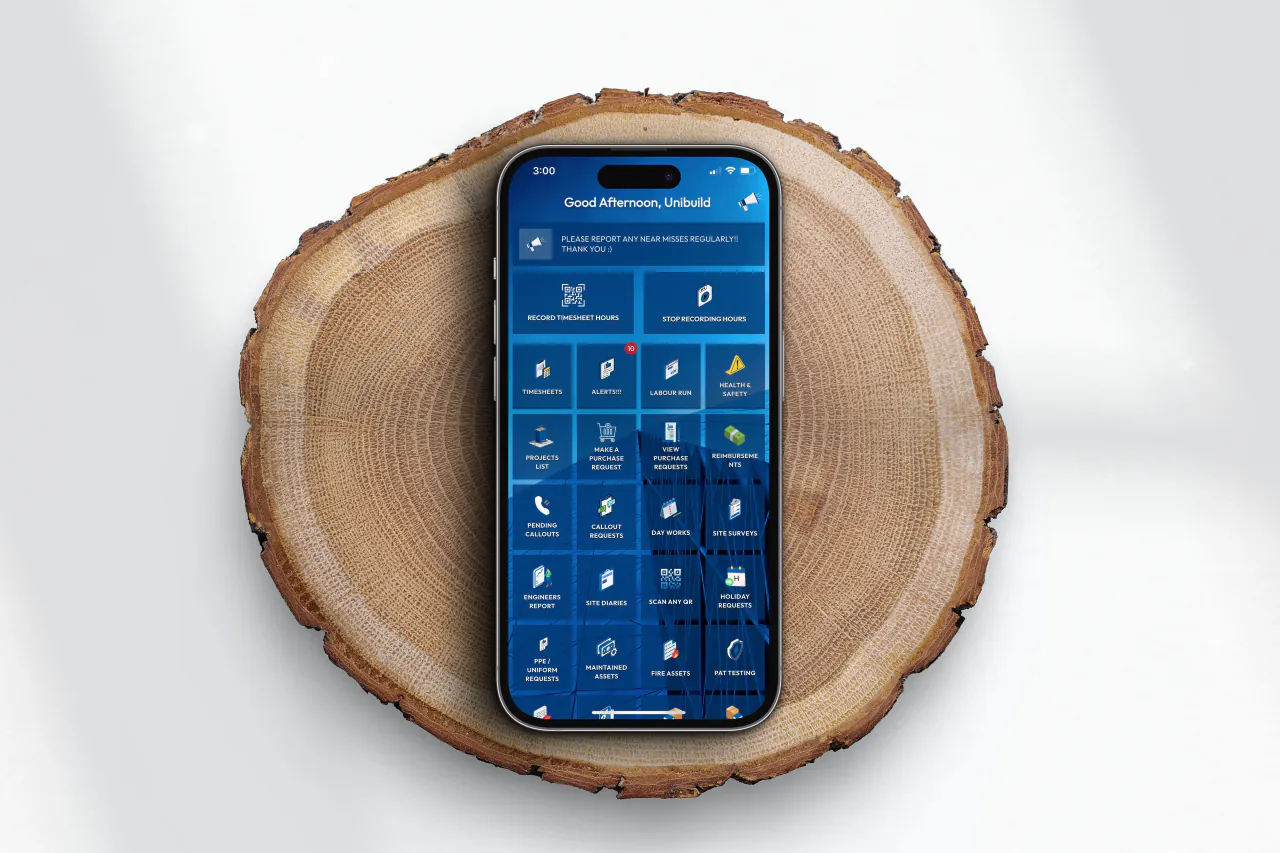
Clients, projects and jobs stop living in four places.
The web system and the staff app go in together. One record per job instead of a folder, a spreadsheet, a diary and somebody's inbox, and the office stops keeping a second copy of everything.
Hours start going past a named person.
Timesheets get an approval step. Every change from then on carries who made it, when, and whether it came from the app or the office.
Site time capture moves onto the phone.
Hours move onto the phone, then onto a printed code at the gate. The day writes itself, with each hour already against the job on the poster.
Purchase ordering joins the existing system.
Purchase ordering is added in February 2026. The July 2026 snapshot reports over 900 purchase orders since its introduction.
Extra work reaches the client portal.
Additional work gets signed twice, once when it is instructed and once when it is finished, and the client can see both.
Where this came from.
These are Unibuild customers, written up by Unibuild. The public sources below cover who the businesses are; the account of the software is ours.