The storage plan is full. Again.
Solved Unlimited storage. No cap on space, files or file size.

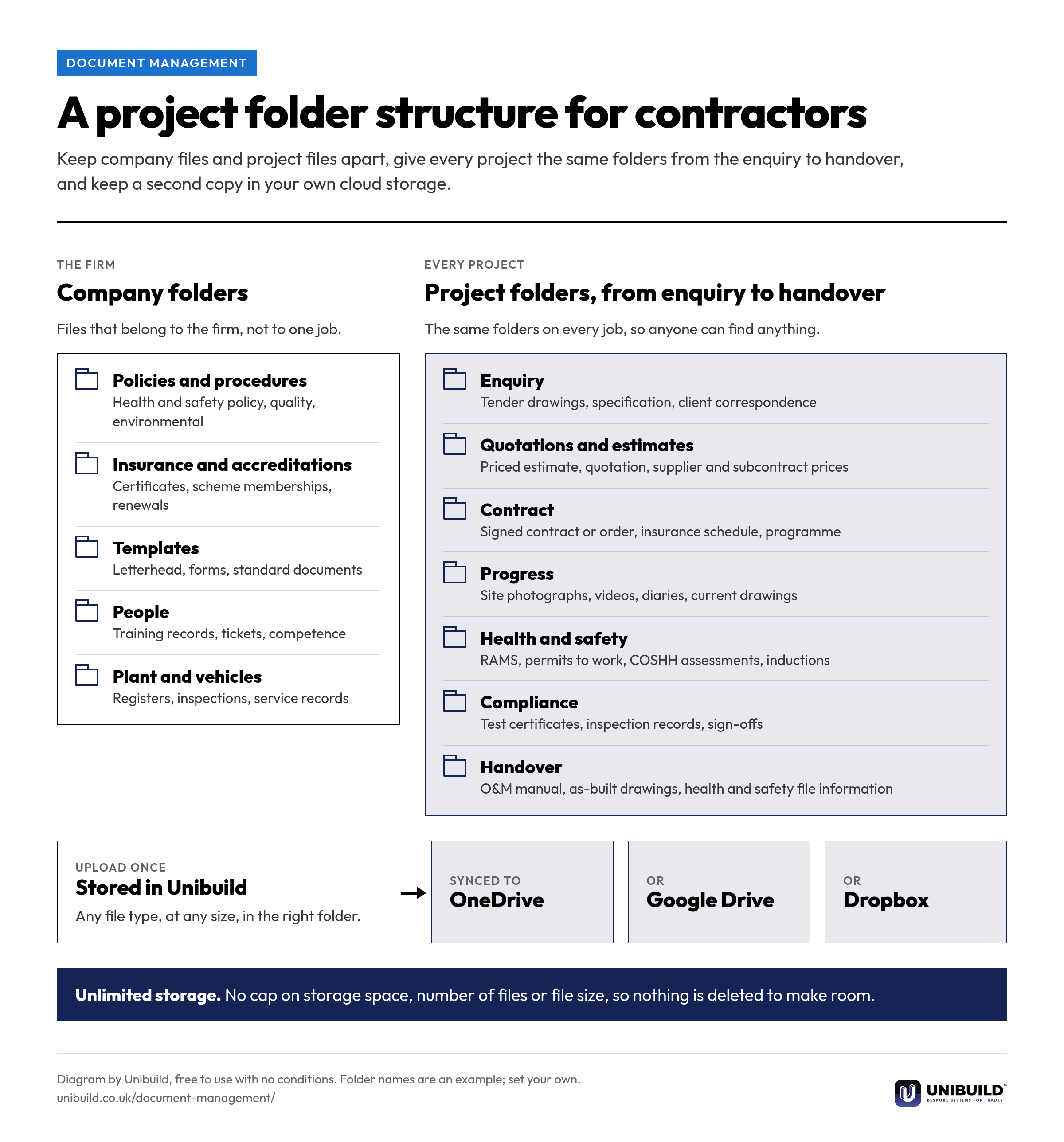
Unibuild stores every file your firm keeps, of any type and any size, with no cap on storage, number of files or file size. General company folders and project folders sit in one bespoke folder system, synced automatically to your own OneDrive, Google Drive or Dropbox.

An example from a fit-out project. The folder names and files are illustrative; each firm sets its own folder structure.
| Folder | What is in it | Synced |
|---|---|---|
| Enquiry | Tender drawings, specification, client emails | Yes |
| Quotations and estimates | Priced estimate, quotation, supplier prices | Yes |
| Contract | Signed contract, order, insurance schedule | Yes |
| Progress | Site photographs, videos, drone survey | Yes |
| Health and safety | RAMS, permits, COSHH assessments | Yes |
| Compliance | Test certificates, inspection records | Yes |
| Handover | O&M manual, as-built drawings | Yes |
From the storage plan that fills up to the company files nobody can find.
Solved Unlimited storage. No cap on space, files or file size.
Solved Every project file in one project folder, in one system.
Solved Any file type at any size: drawings, videos, photographs, spreadsheets.
Solved Every upload synced automatically to your OneDrive, Google Drive or Dropbox.
Solved The project folder fills from the enquiry onwards, so handover is ready.
Solved General company folders in your own folder structure, beside the projects.
Storage is never measured. There is no cap on space, on the number of files or on the size of a single file.
Every kind of file a firm keeps is stored and opened from the same place, in the office portal and on the phone.
Each project has its own folders, so everything about the job is kept together from the enquiry to handover.
Files that belong to the firm rather than a project have their own folders, under the same unlimited storage.
The folders follow your own structure, not a fixed layout. New projects start with the same folders every time.
Every upload is synced automatically to the firm’s own cloud storage, as a second copy it controls.
Company folders for the firm, the same project folders on every job from enquiry to handover, and a second copy in your own cloud storage. Free to use in your own procedures.
| The question | The answer |
|---|---|
| Storage space | Unlimited, never measured |
| File size and number of files | No limit on either |
| File types | Any: Excel, Word, PDF, photographs, videos, drawings |
| Folders | General company folders and project folders, in your own structure |
| Second copy | Synced automatically to your OneDrive, Google Drive or Dropbox |
| Cost | Part of the one monthly figure, with unlimited users |
| The question | A metered storage plan | Unibuild |
|---|---|---|
| How much storage | An allowance per plan | Unlimited, never measured |
| When the space runs out | A bigger plan, or a clear-out | It does not run out |
| The largest file | A size limit per upload | No file size limit |
| Number of files | Often counted | No limit |
| A second copy | Downloaded by hand | Synced to your OneDrive, Google Drive or Dropbox |
| Project and company files | Separate systems | One folder system |
The folder system is set up the way your firm already files. Any change you ask for is built for you, inside the monthly fee. That is how bespoke software works here.

Trades that keep drawings, photographs, certificates and handover files for every job.
Same platform, same login. These are the modules that track what you own, when it is next due, and the certificate that proves it.
Why the wrong drawing revision still reaches site, and how document control stops it.
The documents a firm is asked for long after the job, and how to have them ready.
A 30-minute live demo of document management, from the project folders to the copy arriving in your OneDrive.
Two minutes. A written figure by email, usually the same working day. Unlimited users and unlimited file storage, so everyone and every file is included.
UK-built · CDM · CIS · MTD