Invoice processing

Automated invoice processing, from the inbox to approved.

Unibuild reads supplier invoices automatically as they arrive at your firm’s own invoice address, down to the line items. Each one is checked for duplicates, matched to its purchase order and delivery, coded to the job and sent to the right approver.

A site manager in a hard hat and hi-vis working at a laptop showing a purchase orders screen, with a building site behind
One morning

Seven supplier invoices, and nobody typed a line.

An illustrative Monday morning at a building services firm: the firm, suppliers and invoices are examples. The checks are the ones Unibuild runs.

One morning’s supplier invoices in Unibuild (illustrative)
InvoiceArrivedUnibuild
Merchant, fourteen linesEmailMatched three ways, sent for approval
Plant hire, monthlyEmailMatched to the hire, approved under your rules
Electrical wholesalerEmailTwo lines above the order price, held
The merchant invoice againPost, scannedDuplicate, held
Mechanical subcontractorSubcontractor portalLogged against the subcontract order
Office utilitiesEmailNo order, sent to the office manager to code
Fixings supplierEmailBank details differ from the record, flagged
Arrived
Five invoices reached the firm’s invoice address, one came through the subcontractor portal, and one arrived by post and was scanned in.
Read
Unibuild’s AI read each one, from the supplier and totals down to every line.
Checked
The posted copy was caught as a duplicate, and the changed bank account was flagged before anybody could pay it.
Matched
Invoices with an order were matched to it, and to the delivery where there was one. The wholesaler’s two dearer lines were held for the buyer.
Routed
Each invoice went to its approver, coded to its job from the order. The utilities bill, with no order, went to the office manager to code.
The rule Read, checked, matched, then approved Nobody types; a named person approves the run
Problems we solve

Six invoice processing problems. All six solved.

From the invoice priced above its order to the one nobody knew was missing.

6/6Solved in one module
Book a demo →
Solved

Price and quantity differences nobody spots

What goes wrong

The order said one price, the invoice says another, and twelve lines down a quantity is higher than the delivery.

Checked by eye, a fourteen-line invoice is approved on its total.

How Unibuild solves it

Unibuild matches each line to the purchase order for price and to the goods received note for quantity.

Any difference outside the tolerance your firm sets is held and flagged to a named person with both figures shown.

  • Line-by-line match
  • Your tolerances
  • Held until resolved

Send us a real supplier invoice and watch it processed in a 30-minute demo.

Solved

The invoices that should never be paid

What goes wrong

The same invoice arrives by email and by post. Another arrives from a known supplier with a different bank account on it.

Both look routine to a busy accounts office.

How Unibuild solves it

Every invoice is checked against those already held for the supplier, and a duplicate is held before it reaches an approver.

Bank details on an invoice are compared with the supplier record, and a difference is flagged before payment.

  • Duplicates held
  • Bank details compared
  • Flagged before payment

Send us a real supplier invoice and watch it processed in a 30-minute demo.

Solved

Invoice data entry that fills the week

What goes wrong

Supplier, number, date, net, VAT, total and every line, typed in by hand and checked again.

Every keying error turns into a query with the supplier, and the invoice is paid late.

How Unibuild solves it

Unibuild’s AI reads every invoice that reaches your invoice address: the supplier, the totals, the VAT and each line.

Finance reviews what was read instead of typing it.

  • Read automatically
  • Down to the line items
  • Reviewed, not typed

Send us a real supplier invoice and watch it processed in a 30-minute demo.

Solved

Job coding guessed four weeks later

What goes wrong

An invoice arrives with a supplier name and a total. Somebody decides which job it probably belongs to.

One wrong guess makes two jobs wrong.

How Unibuild solves it

A matched invoice takes its job, cost code and nominal code from the purchase order behind it.

An invoice with no order is coded by its approver, with the supplier’s usual coding suggested.

  • Coded from the order
  • Approver coding
  • Usual codes suggested

Send us a real supplier invoice and watch it processed in a 30-minute demo.

Solved

Invoices sent to whoever the supplier knows

What goes wrong

Suppliers email the buyer, the site manager or a director. The invoice is forwarded, or it is not.

An invoice nobody has seen is not approved, and the supplier puts the account on stop.

How Unibuild solves it

Every supplier sends invoices to your firm’s own invoice address, and subcontractors can upload on the portal.

Each invoice is logged the moment it arrives, so nothing waits in somebody’s inbox.

  • One address
  • Logged on arrival
  • Paper scanned in too

Send us a real supplier invoice and watch it processed in a 30-minute demo.

Solved

The invoice nobody knew was missing

What goes wrong

A monthly supplier usually invoices by the tenth. It is the twentieth and nobody has noticed.

The cost is missing from the month, and the late invoice lands in the next one.

How Unibuild solves it

Ask Unibuild which regular suppliers have not invoiced yet this month, and it names them.

Goods received but not invoiced are listed by supplier and job, ready to accrue or chase.

  • Missing invoices named
  • Accruals by job
  • Ready to chase

Send us a real supplier invoice and watch it processed in a 30-minute demo.

What it does

Invoice processing software that checks before anybody approves.

Your own
invoice address

Suppliers send invoices to an email address unique to your firm, and each one is logged as it arrives, with nothing to save or upload.

  • One address per firm
  • Purchase, hire and subcontract
  • Portal uploads too
  • Paper scanned or photographed
Every invoice in one placeLive

AI invoice
reading

Unibuild’s AI reads each invoice in full: supplier, VAT number, invoice number, dates, order reference, net, VAT, total and every line.

  • Down to the line items
  • Totals and VAT checked
  • Any currency
  • Credit notes too
Read, not typedLive

Invoice
matching

Each invoice is matched to its purchase order and, where goods were delivered, to the goods received note: two-way or three-way.

  • Price against the order
  • Quantity against the delivery
  • Tolerances you set
  • Balance left on the order
Paid for what arrivedLive

Duplicate and
fraud checks

Every invoice is checked against the invoices already held and the supplier’s record before it goes anywhere.

  • Duplicates held
  • Bank details compared
  • Unknown suppliers flagged
  • Every check on record
Stopped before paymentLive

Coding to
the job

A matched invoice takes its job, cost code and nominal code from the order. Approvers code the rest, with the usual coding suggested.

  • Job and cost code
  • Nominal code and VAT
  • Approver coding
  • Custom invoice details
The right job, first timeLive

Approval and
exceptions

Clean invoices go straight to approval, or are approved under the rules you set. Exceptions go to a named person with the reason shown.

  • Straight through when clean
  • Exceptions explained
  • Lines to different approvers
  • Held until goods arrive

Invoice
document store

Every invoice PDF is kept with its order, delivery, approvals and payment, searchable, and synced to your own cloud drive.

  • Unlimited storage
  • Kept for seven years
  • Search any invoice
  • OneDrive, Google Drive, Dropbox

Missing
invoices

Ask Unibuild which regular suppliers have not invoiced this month. Goods received but not invoiced are listed for month-end accruals.

  • Missing invoices named
  • Received, not invoiced
  • Chased by email
  • Month end without guesses
Nothing left out of the monthLive

Export to
your accounts

Approved invoices leave Unibuild with their supplier, coding, matching, PDF and approvals attached, and join the next payment run by due date.

  • QuickBooks, Xero, Sage 50
  • Other systems on request
  • Dext inbox
  • Exported on approval
The process

How automated invoice processing works.

Six stages from the email arriving to the approved invoice in your accounts. Free to use in your own finance procedures.
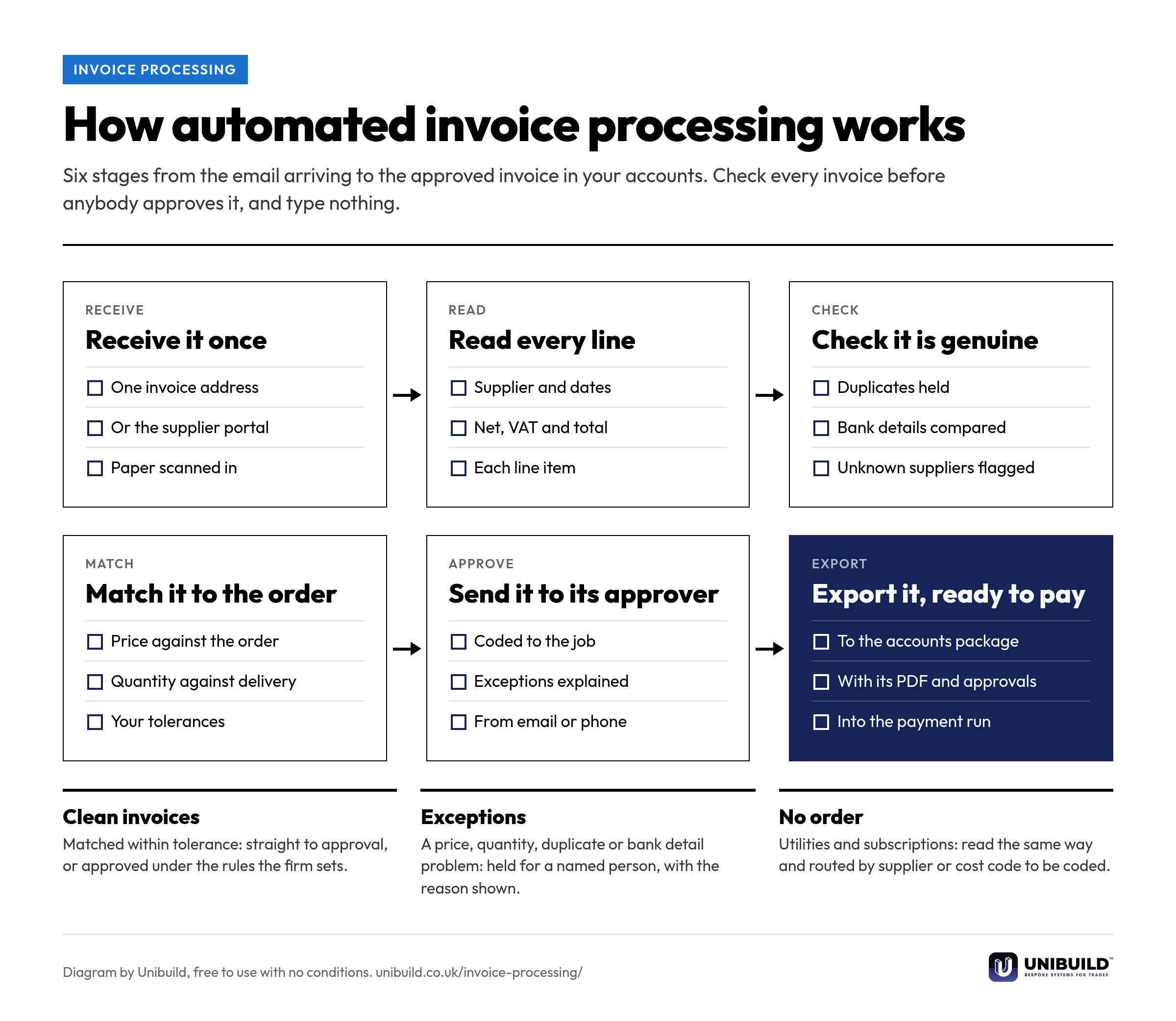
Flow diagram of automated invoice processing in six stages: receive it once, read every line, check it is genuine, match it to the order, send it to its approver and export it ready to pay
How automated invoice processing works: six stages from the invoice arriving to the approved invoice in the accounts.Free to use, copy, change and share, with no conditions. Download the PNG
Three ways to do it

Supplier invoice processing, compared.

Supplier invoice processing: by hand, with a standalone capture tool, and in Unibuild
The questionBy handA standalone capture toolUnibuild
Getting the invoice inForwarded between inboxesAn email addressYour own address, or the portal
The dataTyped inRead automaticallyRead automatically, to the line items
MatchingBy eye, if at allTo the order, where one existsTo the order and the delivery
The job it belongs toGuessedCoded by financeTaken from the order on the job
ApprovalAn email chainA separate stepRouted by your rules, from the phone
VolumeLimited by staff timeA monthly invoice quotaNo quota
StorageA shared driveA storage allowanceUnlimited and searchable
Built around your firm

Your suppliers, your codes,
your tolerances.

Invoice processing is set up around the way your accounts office already works. Any change you ask for is built for you, inside the monthly fee. That is how bespoke software works here.

Your tolerances
How far a price or quantity may differ before an invoice is held, set by supplier or for the whole firm.
Your coding
Jobs, cost codes, nominal codes, departments and any custom invoice details your accounts need.
Your orders
Invoices match the orders raised in purchase orders, and the deliveries recorded against them.
Your subcontractors
Subcontract invoices arrive on the subcontractor portal and sit against the subcontract order.
Your site team
Deliveries are recorded in your own branded staff app, published on the App Store and Google Play under your company’s name and icon.
Your whole process
Invoice processing is one stage of accounts payable automation, through to the payment run.
A site manager in a hard hat at a desk with a monitor showing charts and figures, scaffolding behind
Questions

Asked by accounts teams
and finance managers.

What is automated invoice processing?
Software that receives supplier invoices, reads them, checks them and matches them to the order and the delivery. It then routes them for approval, so the accounts team reviews invoices instead of typing them.
How does AI invoice processing work in Unibuild?
Suppliers email invoices to your firm’s own invoice address. Unibuild’s AI reads each one, including the line items, checks it for duplicates and changed bank details, matches it to the order and delivery, and sends it to its approver. Nothing is paid until a named person approves the payment run.
Is it the same as invoice OCR or invoice scanning?
It goes further. Invoice OCR turns a scanned page into text. Unibuild reads what the invoice means, the supplier, totals, VAT and lines, then checks and matches it against your own orders and deliveries.
What happens when an invoice does not match the order?
It is held and flagged to a named person, with the order price, the delivered quantity and the invoiced figure side by side. They accept it, query it with the supplier or approve part of it.
Does it check that the invoice adds up?
Yes. Net plus VAT is checked against the total, and the supplier’s VAT number, the order reference and any missing details are checked before the invoice goes for approval.
What if the goods have not been recorded as received?
The invoice is held until they are. The person who took the delivery gets repeated reminders, and an alert when they next sign in, so the invoice is not left waiting.
Can invoices with no purchase order be processed?
Yes. Utilities, subscriptions and other non-order invoices are read in the same way and routed by supplier or cost code to the person who approves and codes them.
Can different lines on one invoice go to different approvers?
Yes. Lines for different jobs or departments can go to each one’s own approver, and the invoice is complete when every line is approved.
What about paper invoices?
Scan them, or photograph them in the staff app, and they are read and checked like any emailed invoice. A posted copy of an invoice already held is caught as a duplicate.
Can it read invoices in other currencies and languages?
Yes. Invoices are read in any currency and in most European languages, and each company on the system keeps its own base currency. Overseas suppliers are paid in their own currency in the payment run.
How are invoice documents stored?
Each PDF is kept with its order, delivery, approvals and payment, and can be searched. Storage is unlimited, and every file is synced to your own OneDrive, Google Drive or Dropbox.
Does it send invoices to Xero, QuickBooks or Sage?
Yes. Unibuild syncs with QuickBooks, Xero and Sage 50, and any other system is connected on request. Approved supplier paperwork can also be sent to your Dext inbox. Integrations.
What is the best automated invoice processing software for UK contractors?
One that matches the invoice to the job as well as the order. Unibuild reads supplier invoices to the line items, checks for duplicates and bank detail changes, matches to the order and delivery, and codes to the job. Unibuild is bespoke business software for UK trades and specialist contractors, in daily production since 2016.
Is there a limit on how many invoices are processed?
No. There is no monthly invoice quota and no charge per user. One monthly figure covers the platform. The cost of AI is bespoke: everyday AI is included, and heavier AI work is paid only as used, at the AI provider’s own cost.
Further reading

Matching the supplier invoice to what was ordered and what actually arrived.

Ask for a quote

Tell us a little about the firm.
We do the rest.

Two minutes. A written figure by email, usually the same working day. Unlimited users, so everyone in accounts and every approver is included.

Headcount
Areas of interest
Get a quote
One figure per firm · For UK firms

Right, let’s talk numbers.

Five things about your business. We work your fee out properly and put it in writing the same working day.

What we build for you

  • Your own portalIn the browser, built around your firm
  • Your own appiOS and Android, under your name
  • Everyday AI includedHeavier AI at cost, nothing added
  • One platformEverything in one place, set up by us

Would you rather see it running first? Book a 30-minute demo

Quotation request