Approval workflows

Approval workflows for every invoice, order and payment.

Unibuild routes purchase requests, orders, supplier invoices, expense claims and payment runs to the right people by your own rules: value, job, department, supplier or budget. Approvers act from the email, the phone or the office portal, and every decision is recorded.

A site manager in a hard hat and hi-vis approving on a tablet
One firm’s rules

Nine kinds of spend, nine approval routes.

Illustrative approval rules at a specialist contractor: the bands and roles are examples, and every route is the firm’s own choice.

Approval routes at one firm (illustrative)
SpendRoute
Small orderOne approval, by the contracts manager
Mid-band orderAny one member of the approval committee
Order above the top bandTwo different people, one of them the finance director
Order over the job budgetAdds the commercial director
Matched invoice, within toleranceApproved under the firm’s rules
Invoice with no orderDepartment head codes and approves
Expense claimLine manager, then accounts
New supplier or bank changeAccounts, then a director
Payment runFinance director, final approval
Set once
The rules were agreed at implementation and built into Unibuild. Changing a band or a role later is a setting, not a project.
Applied every time
Each order, invoice, claim and run found its route from its value, job, department and budget, with nobody choosing who to send it to.
Approved anywhere
Approvers acted from a push notification, from the email or from the office portal.
Kept moving
Reminders went out on schedule, one stalled approval escalated, and the director’s approvals passed to a delegate during leave.
The rule Authority, not availability Every decision named and timed
Problems we solve

Six approval problems. All six solved.

From the approver on a roof to the order approved without anybody seeing the budget.

6/6Solved in one module
Book a demo →
Solved

Approvals that wait for somebody to reach a desk

What goes wrong

The contracts manager approves orders and invoices, and spends the week on site. Everything waits for Friday afternoon.

Suppliers chase, deliveries slip and the month does not close.

How Unibuild solves it

Every approval arrives as a push notification in your own staff app and as an email. The approver sees the full order or invoice and acts from either.

Approving from the email needs no sign-in.

  • Push notification
  • Approve from the email
  • Full detail shown

Bring your approval limits and see them built in a 30-minute demo.

Solved

An approval that lives in somebody’s sent items

What goes wrong

A director replies “fine” to a forwarded quote. Months later the auditor asks who approved the spend.

Nobody can find the email.

How Unibuild solves it

In Unibuild every approval, rejection and query is recorded against the order or invoice with a name and a time.

Comments stay with the decision, on the record.

  • Name and time
  • Comments kept
  • Searchable later

Bring your approval limits and see them built in a 30-minute demo.

Solved

A single approver who becomes a bottleneck, then a workaround

What goes wrong

One manager approves everything. Within a fortnight they are the bottleneck, and the quiet fix is people approving their own orders.

The control exists on paper only.

How Unibuild solves it

Approval runs on value bands. Small spends clear on one approval, the middle band goes to any member of an approval committee, and above the top band it needs two different people.

Nobody can approve an order they raised.

  • Value bands
  • Approval committee
  • Never your own

Bring your approval limits and see them built in a 30-minute demo.

Solved

An invoice somewhere between three managers

What goes wrong

A supplier rings about an invoice. Accounts thinks the site manager has it, the site manager thinks it went to the director.

Everybody spends ten minutes finding out.

How Unibuild solves it

Every order and invoice shows who has approved it, who has it now and how long it has been there.

Reports show what is waiting, average approval times and where things stall.

  • Who has it now
  • How long it has waited
  • Bottlenecks reported

Bring your approval limits and see them built in a 30-minute demo.

Solved

Finance spending its week chasing signatures

What goes wrong

Accounts sends polite reminders, then less polite ones, then rings.

The firm is paying an office salary to be a reminder service.

How Unibuild solves it

Reminders go to the approver on the schedule you set, with a daily digest if they prefer.

An approval that stalls escalates to the next person, and approvers on leave hand over to a delegate.

  • Automatic reminders
  • Escalation
  • Delegates during leave

Bring your approval limits and see them built in a 30-minute demo.

Solved

Approvals made with half the picture

What goes wrong

Each order looks reasonable on its own. Nobody approving it can see that the job’s materials budget went last week.

The overspend is found at month end.

How Unibuild solves it

The approver sees the order, the job, the budget left and what has already been committed.

An order that would take a budget over adds the approver your rules name, such as the commercial director.

  • Budget beside the order
  • Committed spend shown
  • Over budget, longer route

Bring your approval limits and see them built in a 30-minute demo.

What it does

Approval workflow software built around your rules.

Routes by
your conditions

Every route is chosen from conditions you set, simple for small spends and as detailed as your controls need for large ones.

  • Value bands
  • Job, department or company
  • Supplier and cost code
  • Budget position
Your rules, applied every timeLive

Multi-step
approval

As many steps as a spend needs, each one a named person or a group, with branching where the conditions change.

  • One person
  • Any one of a group
  • Every member of a group
  • Two different people
Shared accountabilityLive

Approve
anywhere

Approvers view, approve, reject, query or comment from wherever they are, with the full document in front of them.

  • Push notification in your app
  • From the email, no sign-in
  • Office portal
  • Daily digest if preferred
Decisions from siteLive

Reminders and
escalation

Reminders go out on the schedule you set. A stalled approval escalates, and approvers on leave hand over to a delegate.

  • Automatic reminders
  • Escalation rules
  • Delegates during leave
  • Nothing chased by hand
Nothing sits for a weekLive

Line-item
approval

Lines on one invoice or order for different jobs or departments go to each one’s own approver.

  • Split by job
  • Split by department
  • Complete when all approve
  • Part approval recorded
The right person per lineLive

Actions in
the route

A route does more than collect signatures. Each step can trigger the next piece of work automatically.

  • Issue the order to the supplier
  • Email the requester or supplier
  • Update details on the record
  • Export to the accounts
Approved means doneLive

Budget beside
the decision

The approver sees the job, the budget left and the spend already committed before they decide.

  • Budget left
  • Committed spend
  • Supplier history
  • Over budget, longer route

Live status
and reports

Every approval shows who has it and for how long. Reports show what is waiting, average approval times and bottlenecks.

  • Who has it now
  • Time at each step
  • Average approval time
  • Ask Unibuild who is holding it
Bottlenecks in plain sightLive

Audit
trail

Every approval, rejection, query, reminder and change is recorded with a name and a time, and kept for seven years.

  • Named and timed
  • Comments kept
  • Nobody approves their own
  • Locked once approved
The answer for the auditorLive
The process

How an approval route works.

Six stages from a spend entering the route to the decision on record. Free to use in your own procedures.
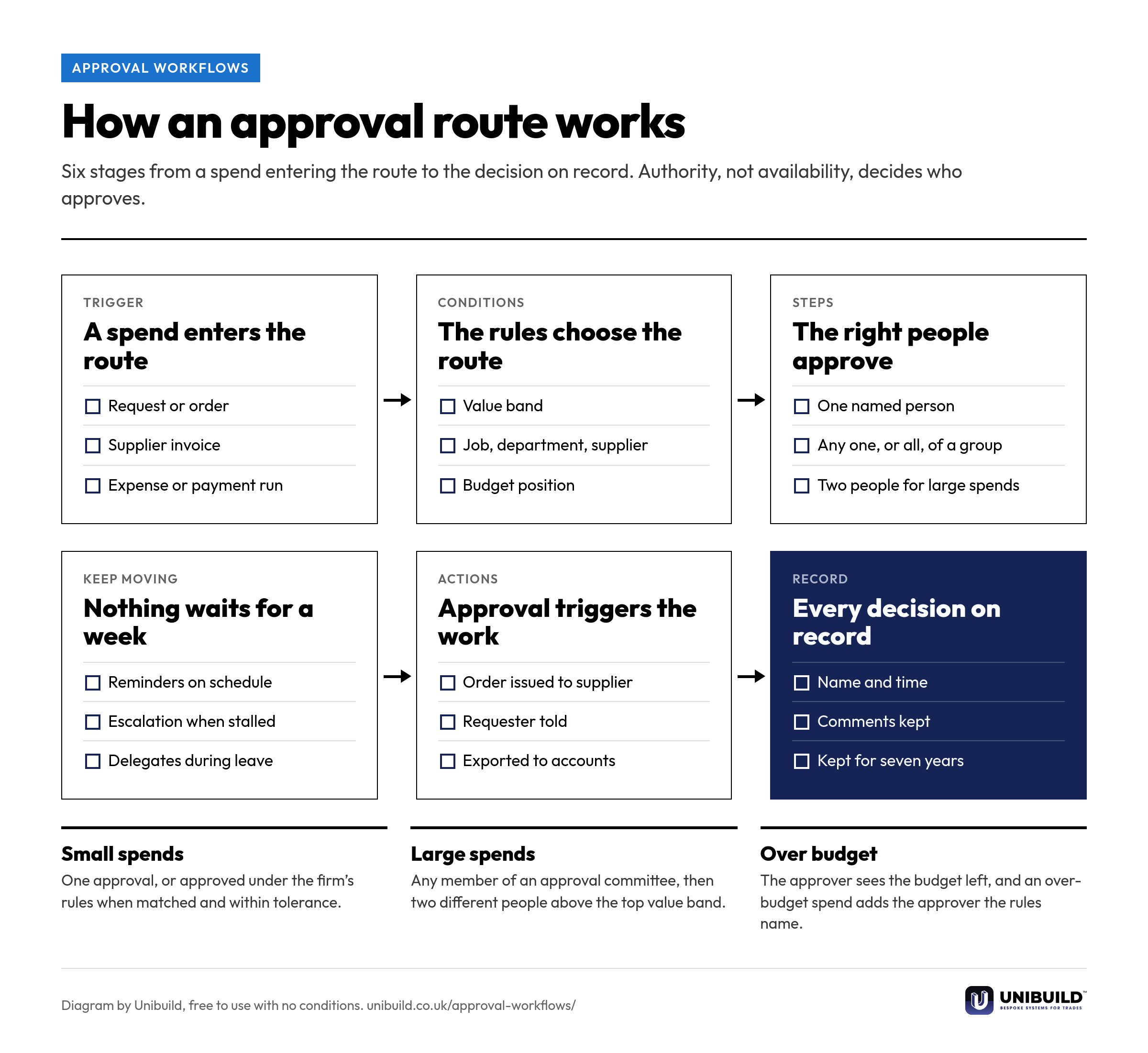
Flow diagram of an approval workflow in six stages: a spend enters the route, the rules choose the route, the right people approve, reminders and escalation keep it moving, approval triggers the work, and every decision is on record
How an approval route works: six stages from a spend entering the route to the decision on record.Free to use, copy, change and share, with no conditions. Download the PNG
Three ways to approve

Invoice and purchase approval, compared.

Invoice and purchase approval: email and signatures, preset approval software, and Unibuild
The questionEmail and signaturesPreset approval softwareUnibuild
Who approvesWhoever is askedChosen from preset optionsYour rules, built for you
Approving away from a deskA reply from the phoneThe vendor’s appYour own app, or the email
Large spendsOne signatureExtra stepsTwo different people, by value band
Budget at the decisionNot seenSometimes shownShown, and over budget takes a longer route
ChasingBy handRemindersReminders, escalation and delegates
The recordSomebody’s inboxA log in the toolNamed and timed, on record
Approvers you can addAnyoneLimited by user licencesUnlimited users
Built around your firm

Your limits, your people,
your process.

Approval routes are built around the controls your firm already has, however many steps they take. Any change you ask for is built for you, inside the monthly fee. That is how bespoke software works here.

Orders
Purchase requests become orders once approved, in purchase orders.
Invoices
Supplier invoices arrive read and matched from invoice processing.
Expenses
Site purchases and claims follow the same routes in expense management.
Payments
Payment runs and supplier bank changes are approved in accounts payable automation.
Your app
Approvals arrive in your own branded staff app, published on the App Store and Google Play under your company’s name and icon.
Your controls
Every route leaves the audit trail a finance officer or auditor asks for.
A site manager in a hard hat and hi-vis checking a phone in front of heavy plant
Questions

Asked by finance directors
and office managers.

What is an approval workflow?
The route a request for money takes before it is committed or paid: who approves it, in what order, and under what conditions. In Unibuild one approval engine covers purchase requests, orders, supplier invoices, expense claims, payment runs and supplier changes.
What does invoice approval software do?
It sends each supplier invoice to the right person for sign-off, records each decision, and shows finance what is approved, rejected or waiting. In Unibuild the invoice arrives already read and matched, so the approver decides on a checked document.
Can approvals be multi-step?
Yes. A route can have as many steps as you need. A line manager might approve first, then a finance director above a value, with the commercial director added when the job budget is exceeded.
Can a group of people approve?
Yes. A step can need any one member of a group, or every member. Work can also go round a group in turn, or to whoever has the fewest approvals waiting, skipping anyone on leave. Above your top value band, an order needs two different people.
Can an approver ask a colleague to approve as well?
Yes. Any approver can send a request to a named person for an extra approval outside the usual route. It is recorded like any other step.
Can we approve invoices by email only?
Yes. Approvers receive an email with approve and reject actions in it, and can respond from the inbox without signing in. The decision is recorded exactly as if it were made in the portal.
Can we approve on the mobile app?
Yes. Approvals arrive as a push notification in your own branded staff app on iOS and Android, where approvers view, approve, reject and comment on orders, invoices and claims.
What happens when an approver is on holiday?
Their approvals pass to a delegate for the dates of their leave. An approval that stalls for any other reason escalates to the next person.
Do approvers get reminders?
Yes. Reminders go out on the schedule you set, or as a daily digest, and escalation rules move an approval on when it has waited too long.
Can small spends be approved automatically?
Yes, if your rules allow it. A matched invoice within tolerance, or a spend below a value you set, can clear without a person. Every payment run is still approved by name.
How do purchase requisitions work with approvals?
A requisition is the internal request to spend. It follows its approval route, and once approved it becomes a purchase order sent to the supplier, with nothing retyped. Requisition and order compared.
Can we report on how long approvals take?
Yes. Reports show what is waiting, who has it, average approval times and where approvals stall. Ask Unibuild who is holding up approvals and it answers from the live records.
What is the best approval workflow software for UK businesses?
One built around your own controls rather than a vendor’s presets. Unibuild routes orders, invoices, expenses and payment runs by value, job, department, supplier and budget, from the phone or the email. Unibuild is bespoke business software for UK trades and specialist contractors, in daily production since 2016.
Do approvers need a paid licence each?
No. Users are unlimited, so every approver, requester and accounts clerk is included in the one monthly figure, fixed for three years.
Further reading

The internal request and the order sent to the supplier, and where approval sits between them.

Ask for a quote

Tell us a little about the firm.
We do the rest.

Two minutes. A written figure by email, usually the same working day. Unlimited users, so every approver is included.

Headcount
Areas of interest
Get a quote
One figure per firm · For UK firms

Right, let’s talk numbers.

Five things about your business. We work your fee out properly and put it in writing the same working day.

What we build for you

  • Your own portalIn the browser, built around your firm
  • Your own appiOS and Android, under your name
  • Everyday AI includedHeavier AI at cost, nothing added
  • One platformEverything in one place, set up by us

Would you rather see it running first? Book a 30-minute demo

Quotation request