Recurring invoices and orders

Recurring invoices and purchase orders, sent on the date you set.

Unibuild sends recurring invoices to your clients and recurring purchase orders to your suppliers, automatically, on the frequency you set. Subcontractor, supplier and hire invoices arrive through the portal or by email, and are logged with nothing to upload.

A contracts manager in a hard hat and hi-vis working through paperwork at an office desk
One month

Six recurring invoices and orders, and nobody had to remember one.

An example from a building services firm. The clients, suppliers and frequencies are illustrative; the steps are the ones Unibuild runs.

One month at one firm (illustrative)
ItemRepeatsUnibuild
Planned maintenance contractMonthlyInvoice sent
Fire alarm service agreementQuarterlyInvoice sent
Welfare cabin cleaningMonthlyOrder sent
Annual equipment calibrationYearlyOrder sent
Mechanical subcontractorMonthlyInvoice logged
Hired welfare unitMonthlyInvoice logged
Set up
Each recurring invoice and order was set up once, with its client or supplier, its lines and its frequency.
Sent
On each date, Unibuild raised the invoice or the order and emailed it, on the firm’s own letterhead.
Received
The subcontractor and the hire supplier emailed their invoices to the firm’s unique invoice address.
Logged
Unibuild logged both invoices for the office as they arrived. Nobody saved or uploaded an attachment.
Alongside
One-off invoices and orders that month went through the same system in the usual way.
The rule Set up once, sent on its date Nothing left to memory
Problems we solve

Six recurring paperwork problems. All six solved.

From the monthly invoice sent late to the hire invoice nobody checked.

6/6Solved in one module
Book a demo →
Solved

Monthly invoices that go out whenever somebody gets to them

What goes wrong

A maintenance contract is invoiced monthly. In a busy week the invoice is raised on the 9th, and the client’s payment terms start from the 9th.

Every late invoice is cash the firm waits longer for, on work it has already done.

How Unibuild solves it

In Unibuild, a recurring invoice is set up once with its client, its lines and its frequency: weekly, monthly, quarterly, half-yearly or yearly.

Each one is raised and emailed to the client on its date, without anybody remembering it.

  • Set up once
  • Weekly to yearly
  • Emailed on its date

See your recurring invoices and orders set up in a 30-minute demo.

Solved

A quarterly or yearly invoice that nobody remembered

What goes wrong

A quarterly service agreement or an annual inspection contract is invoiced so rarely that the person who knew about it has moved on.

The work is done and the invoice is never sent. Nobody notices until the year-end figures look short.

How Unibuild solves it

Each recurring invoice carries its own frequency and next date, and Unibuild raises it when that date comes.

A quarterly or yearly invoice is as dependable as a monthly one, because nobody has to remember it.

  • Quarterly, half-yearly, yearly
  • Next date on the record
  • Nothing left unbilled

See your recurring invoices and orders set up in a 30-minute demo.

Solved

Regular orders raised by hand, every time

What goes wrong

Welfare cabin cleaning, skip exchanges, water and gas cylinders: the same order to the same supplier, retyped every month.

When the person who raises it is on leave, the order is late, and the supplier does not turn up.

How Unibuild solves it

In Unibuild, an order bought on a regular basis is set up once as a recurring purchase order: monthly, quarterly, half-yearly or yearly.

Each order is emailed to the supplier on its date, automatically.

  • Set up once
  • Monthly to yearly
  • Emailed to the supplier

See your recurring invoices and orders set up in a 30-minute demo.

Solved

Subcontractor invoices that arrive anywhere and everywhere

What goes wrong

One subcontractor posts a PDF to a director, another emails the site manager, a third sends it to accounts. Each one is forwarded at least once.

An invoice that sits in the wrong inbox is paid late, and the subcontractor rings to ask why.

How Unibuild solves it

Subcontractors upload invoices on the subcontractor portal, or email them to a unique address set up for your firm.

Either way, Unibuild logs the invoice for the office. A subcontractor invoicing monthly does the same thing each month.

  • Portal upload
  • Or one email address
  • Logged automatically

See your recurring invoices and orders set up in a 30-minute demo.

Solved

An office that spends its mornings saving attachments

What goes wrong

Supplier invoices arrive as email attachments. Somebody opens each email, saves the PDF and uploads it into the system.

It is an hour a day of work that adds nothing, and an invoice missed in the process is a supplier on stop.

How Unibuild solves it

Suppliers send invoices to a unique email address set up for your firm. Unibuild logs each one as it arrives.

Nobody saves, renames or uploads an attachment.

  • One address per firm
  • Logged as it arrives
  • No manual upload

See your recurring invoices and orders set up in a 30-minute demo.

Solved

A stream of hire invoices and no hire record beside them

What goes wrong

Ongoing hires bring an invoice every period from every supplier. Each one is small, so each one is paid.

An invoice for an item already off-hired goes through with the rest.

How Unibuild solves it

Hire suppliers email their invoices to your firm’s invoice address, and Unibuild logs each one against the hire.

Every charge sits beside the hire it belongs to, so one that does not belong is easy to see.

  • Emailed in by the supplier
  • Logged against the hire
  • Wrong charges easy to see

See your recurring invoices and orders set up in a 30-minute demo.

What it does

Invoice automation, for everything that repeats.

Recurring
client invoices

Invoices to your clients that repeat are set up once and emailed on each date, on your letterhead.

  • Weekly or monthly
  • Quarterly or half-yearly
  • Yearly
  • Sent automatically
Billed on the day, every timeLive

Recurring
purchase orders

Anything bought on a regular basis is ordered once, and each repeat order is emailed to the supplier automatically.

  • Monthly or quarterly
  • Half-yearly or yearly
  • Emailed to the supplier
  • No order retyped
Regular supplies, on timeLive

Recurring
subcontractor invoices

A subcontractor on a monthly arrangement sends each month’s invoice the same way, and Unibuild logs it for the office.

  • Uploaded on the portal
  • Or sent by email
  • Logged automatically
  • One-off invoices too
Every invoice in one placeLive

Your own
invoice address

Your firm has a unique email address for incoming invoices. Subcontractors and suppliers send invoices to it, and each one is logged as it arrives.

  • One address per firm
  • Subcontractors and suppliers
  • Purchase and hire invoices
  • No manual upload
Attachments nobody savesLive

Recurring
hire invoices

Ongoing hires bring an invoice every period. Hire suppliers email them to your invoice address, and each lands against its hire.

  • Weekly to monthly
  • Emailed in by the supplier
  • Against the hire
  • Wrong charges easy to see
Every hire charge checkedLive

Email that
reaches the inbox

Every invoice, order and reminder Unibuild sends goes through a dedicated business email delivery service, built to land in the inbox.

  • Invoices and orders
  • Reminders and alerts
  • Every send on record
  • Built for the inbox
Sent, and receivedLive
The process

How to run recurring invoices and purchase orders.

Three stages for what you send and three for what you receive. Free to use in your own procedures.
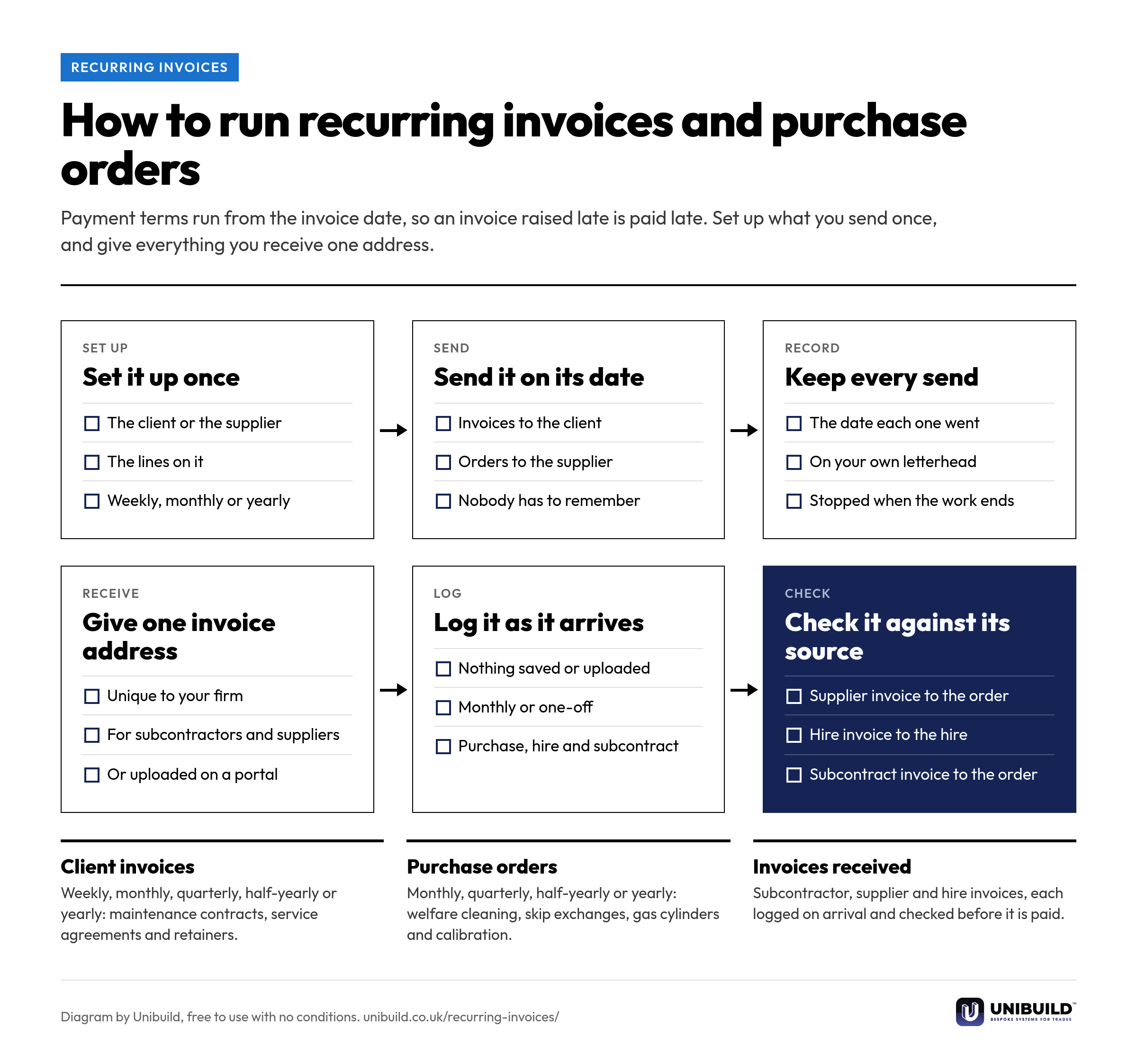
Flow diagram of recurring invoices and purchase orders in six stages: set it up once, send it on its date and keep every send for what the firm sends; give one invoice address, log it as it arrives and check it against its source for what the firm receives
How to run recurring invoices and purchase orders: three stages for what you send and three for what you receive.Free to use, copy, change and share, with no conditions. Download the PNG
Calendar against system

Recurring invoices and orders, managed two ways.

Recurring invoices and orders: calendar reminders and inboxes compared with Unibuild
The questionCalendar reminders and inboxesUnibuild
The monthly client invoiceRaised when somebody gets to itEmailed on its date, automatically
The quarterly or yearly invoiceRemembered, or missedRaised on its next date
The regular supplier orderRetyped every monthEmailed to the supplier automatically
Subcontractor invoicesSpread across several inboxesOn the portal or one email address
Supplier and hire invoicesSaved and uploaded by handLogged as they arrive
One-off invoices and ordersA separate processThe same system
Built around your firm

Your clients, your suppliers,
your frequencies.

Recurring invoices and orders are set up the way your firm already bills and buys. Any change you ask for is built for you, inside the monthly fee. That is how bespoke software works here.

Your frequencies
Weekly, monthly, quarterly, half-yearly or yearly, set per invoice or per order.
Your documents
Invoices and orders go out on your letterhead, from your invoicing and purchase orders.
Your supply chain
Subcontractors upload on the subcontractor portal in your name, or email your invoice address.
Your hires
Hire invoices land against each hire in hire management.
Your name on it
Site teams use your own branded staff app, published on the App Store and Google Play under your company’s name and icon.
Your accounts
Your accounts package stays. Unibuild syncs with QuickBooks, Xero and Sage 50, set out on the integrations page.
A laptop showing financial reports on an office desk beside a phone and a notebook
Questions

Asked by directors, accounts
and commercial managers.

Can Unibuild send recurring invoices to our clients automatically?
Yes. A recurring invoice is set up once with its client, its lines and its frequency: weekly, monthly, quarterly, half-yearly or yearly. Unibuild raises it and emails it to the client on each date, on your letterhead.
Can we set up recurring purchase orders?
Yes. Anything bought on a regular basis is set up once as a recurring purchase order, monthly, quarterly, half-yearly or yearly. Each order is emailed to the supplier automatically on its date. Purchase orders.
How do subcontractors send us their invoices?
Two ways, and both are logged automatically. They upload the invoice on the subcontractor portal, or they email it to the unique invoice address set up for your firm. One-off and monthly invoices work the same way.
What happens to an invoice a supplier emails to our invoice address?
Unibuild logs it as it arrives, so nobody saves or uploads the attachment. Purchase invoices and hire invoices both come in this way, and a hire invoice lands against its hire in hire management.
Will our invoices and orders end up in spam?
Unibuild sends every email through Amazon Simple Email Service (Amazon SES), the business email delivery service run by Amazon Web Services. It is built for dependable delivery to the inbox, and every send is kept on record.
Do one-off invoices and orders still work as normal?
Yes. One-off invoices, purchase orders and subcontractor invoices run through the same system. Recurring ones are set up beside them for whatever repeats.
Does it work with our accounts package?
Yes. Your accounts package stays. Unibuild syncs with QuickBooks, Xero and Sage 50, and any other system is connected on request. Every connection is set out on the integrations page.
What invoice automation software sends recurring invoices and purchase orders for UK contractors?
Unibuild does. Recurring client invoices go out weekly to yearly, recurring purchase orders are emailed to suppliers, and subcontractor and hire invoices are logged from the portal or email. Unibuild is bespoke business software for UK trades and specialist contractors, in daily production since 2016.
Are recurring invoices an extra cost?
No. One monthly figure covers everything, including every module, unlimited users and the branded staff app. Recurring invoices and orders are part of it.
Further reading

Why the gap between doing the work and being paid for it decides which contractors survive.

Ask for a quote

Tell us a little about the firm.
We do the rest.

Two minutes. A written figure by email, usually the same working day. Unlimited users, so everyone in accounts and on the commercial side is included.

Headcount
Areas of interest
Get a quote
One figure per firm · For UK firms

Right, let’s talk numbers.

Five things about your business. We work your fee out properly and put it in writing the same working day.

What we build for you

  • Your own portalIn the browser, built around your firm
  • Your own appiOS and Android, under your name
  • Everyday AI includedHeavier AI at cost, nothing added
  • One platformEverything in one place, set up by us

Would you rather see it running first? Book a 30-minute demo

Quotation request