The platform

Everything from the gate
to the bank, in one place.

Most firms run on fifteen apps stitched together with WhatsApp, spreadsheets and goodwill. Unibuild is one platform, one login, one number everyone in the firm trusts. It is bespoke, shaped to the way your firm works, and your staff use an app under your own name.

Ask for a quote

Five questions.
A figure in writing.

Two minutes, and no rate card to decode. Unlimited users, so the answer does not move when you take on a gang of twelve.

Headcount
Areas of interest

Usually answered the same working day, by a person who has read it.

Under one login

Everything the firm
runs on.

One login in place of the timesheet app, the spreadsheet, the permit pad and the shared drive. Thirty-plus modules, sixteen of which use AI on a real job, from compliance and paperwork through to cost and reporting. What it does inside them is shown in the demo, and the families it runs in are on the AI page. Anything you need is built for you, inside the monthly fee.

The point One database, so every screen agrees Entered once · costed, filed and reported from there
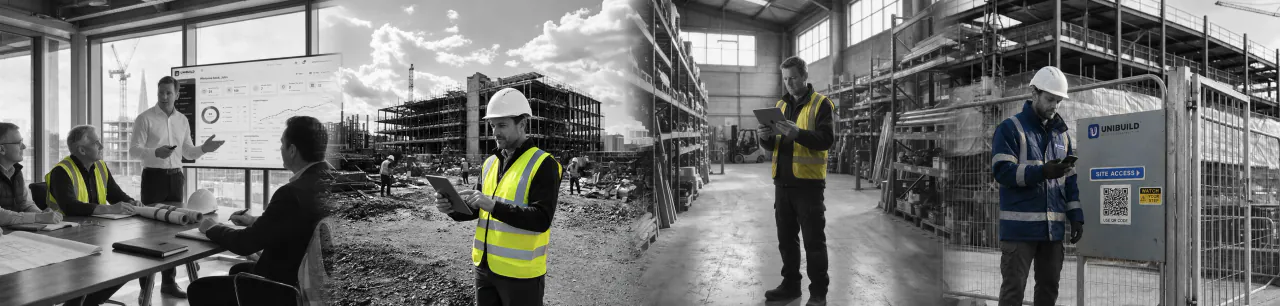
Unibuild in use across four settings: an office progress meeting, a site manager with a tablet, the plant store, and a worker signing in at a site access gate

Anything you need
gets built for you.

30+modules, one login
16of them use AI
58document types, your letterhead
Unlimitedusers, never per seat

The full module directory

The modules

Thirty-plus modules,
no seams.

Use the lot or use the four you actually need. Either way the records sit in the same database and the people log in once, so a figure entered on site is the figure the office invoices against. The nine below are where most firms start.

Workforce
and time

Daily

Who is on which site, who clocked in, who is off sick, who is on holiday, who has a ticket expiring on the 19th. One roster, with a timesheet inside it.

  • QR clock-in, timed by the server
  • Tickets, training and expiry dates
  • Holiday, sickness, leave planner
  • Hours on the job at dated cost rates
Inside · Roster, TimesheetsLive

Health
and safety

CDM

RAMS, toolbox talks, inductions, near-misses, RIDDOR. The bits that win you the next tender if you can produce them, and lose you a job if you cannot.

  • RAMS templates by trade
  • Daily toolbox talks, signed on phone
  • RIDDOR-ready incident logs
  • CDM 2015 documentation pack
Inside · RAMS, RIDDOR, CDMLive

Project
and site

Live

The plan against the actual. Site diaries, day works, drawings, variations and the photograph trail behind every line. What the contracts manager walks through every Monday.

  • Weekly labour planner and wallboard
  • Drawings opened from the job, current revision
  • Variations with the evidence attached
  • Photographs approved before a client sees them
Inside · Diaries, Day works, DrawingsLive

Financial
management

Cash

Applications for payment, retention, aged debt and a live cost position. The commercial side of the business, running on one ledger since 2016.

  • Applications, retention, aged debt
  • VAT treatments including reverse charge
  • Live cost position per job
  • Feeds your accounts package
Inside · Applications, Retention, CostLive

Subcontractor
portal

Subbies

Three pages, scoped to one company. They read the order you actually issued, raise their invoice against it, and watch it move from pending to approved to paid.

  • Their approved orders, as issued
  • They raise the invoice against the order
  • Approval and payment status on every row
  • Expired cover demotes them overnight
Inside · Orders, Invoices, StatusLive

Plant
and equipment

Reg

The register of what you own and what you hire. PAT and LOLER dates, serial numbers, bin locations and where every tower is standing this week.

  • Owned and hired in one register
  • PAT, LOLER, calibration due dates
  • Picked against the real serial and bin
  • Damage and repair history per item
Inside · Register, HiresLive

Advanced Estimating
and quotes

Pre

From a measure to a written quote your client signs. Reusable line items, mark-up rules, tender packs and the gross margin on the page before you send it.

  • One dated library, with supplier part numbers
  • Markup classes, snapshotted onto the line
  • Quotation PDFs on your letterhead
  • Estimate against actual, section by section
Inside · Library, QuotesLive

Comms
and approvals

Yes

The operational record stops living in a group chat. Requests, sign-offs and photographs sit against the project, and the decisions that hold work up arrive in one queue.

  • One approval queue, with a live count
  • Push to the field app, email to the office
  • Outbound WhatsApp alerts for safety events
  • Every send logged with its content
Inside · Approvals, NotificationsLive

Insight
and reporting

Board

Nobody types anything into these. The management picture is assembled from work your team recorded while doing their own jobs, which is why it is current to the hour and why one person's absence does not stop the numbers appearing.

  • Labour hours and cost, at dated rates
  • Purchase order spend, across suppliers and jobs
  • Subcontract exposure: ordered, invoiced, paid
  • Live cost position, current to the hour
Inside · Reports, Cost positionLive
Role by role

What each of them sees when they log in.

Everyone on the firm logs in to the same Unibuild, but the first screen is different depending on what they came to do. The director sees the position. The site manager sees today's gate. The accounts clerk sees what is due. Same records, six different sets of pages, granted per person.

People across the firm logging into Unibuild for their own day
Director

The position, with the why, on one screen.

The first thing a director sees is the job position as it stands today rather than at the final account. Cost to date, committed spend, aged debt by the manager responsible, and what is waiting on a decision. Click any total and you are looking at the timesheet, the order or the valuation it came from.

Cost to date Committed spend Aged debt by manager Unbilled work Approvals waiting Audit trail
Director · illustrative
Approvals waiting on you6
Aged debt · 90 days plusby manager
Committed spend, open orderscounted at commitment
Approved work not yet applied forqueue
Subcontractors out of approved statusexpired cover
Labour cost this weekat dated rates
Every totalopens to the line

The panel above illustrates the kind of line each person opens. It is drawn, not a screenshot of a customer's data.

A day on Unibuild

One day, and every
record made once.

Every step below is a thing the two live deployments do on an ordinary working day. It is a composite rather than one firm's diary, because we describe a client's business only in the shape they have agreed to. What it shows is the mechanism: one tap, one record, and nothing typed a second time.

06:30
Pre-start

Operatives clock in at the gate, and sign the RAMS.

The operative opens your app and scans a laminated poster on the site board. A photograph is taken, the location is checked against the site's geofence and recorded, and the time is written by the server rather than read from the handset. The RAMS for that trade is signed on the same screen.

Workforce + Health and Safety
07:45
Site walk

Progress photographs go up, and wait for approval.

Taken where they were taken, dated, attached to the job. They sit as pending rather than published, so the office decides what the client sees. Nothing reaches a customer automatically.

Project and site + Client portal
09:10
Counter

A purchase request is approved from a phone.

Raised at the merchant's counter against the job. A named approver sees the project, the supplier and the value, and answers. The order number is issued only on approval, so nothing is bought without one.

Purchase orders + Approvals
11:20
Stores

A delivery is picked against the real serial and bin.

The picker chooses the serial number going out and the bin it comes from, and cannot over-allocate. The receiver signs on the phone, the plant reassigns to that job and the stock moves itself. There is no posting step to forget.

Assets and inventory
13:00
Lunch

Toolbox talk delivered, and signed on the phone.

Signed at the point of delivery by the person it was delivered to, filed against the site, the trade and the operative, with the date it actually happened. No sheet going round on a clipboard and no signature added later by somebody who was not there.

Health and Safety
15:40
Accounts

A subcontractor invoice arrives against its order.

Raised by the subcontractor in their own portal against one of their own orders, so the project comes from the order rather than being typed. The queue shows the order value beside everything already invoiced against it, which is how a second invoice for the same work gets caught before it is paid.

Subcontractor portal + Financial
17:15
Close

The site diary is written, on the day.

Trades on site and how many of each, the weather, and what happened. About two minutes. In eighteen months, when somebody argues about a delay, this is the contemporaneous record that answers it, and it exists because it was never assembled after the fact.

Project and site
What it talks to

Fewer connections,
because there is less to join.

Unibuild is one system on one database, so most of what other platforms have to synchronise is the same record. Where it does reach outside itself, these are the connections in use. The integrations page sets out what each one does.

In daily use

Bookkeeping capture, by emailMicrosoft OneDrive Transactional email, every send loggedPush notifications QR generationGeocoding for clock-in locations CSV, XML and JSON exports, payroll included

Set to the job

WhatsApp alerts, outbound templates Weather lookup, recorded by the diary author

Built for yours

81 token authenticated endpoints already in production A connection you need is built for you Inside the monthly fee
How it is built

UK hosted, UK supported, and specific about it.

Where a claim below can be verified, it is stated exactly. Where it cannot, it is not stated at all. If a procurement questionnaire needs any of this in writing, ask and you get it in writing rather than as a web page.

Hosting

AWS eu-west-2 (London). Data does not leave the United Kingdom. We do not use third-party trackers, ad-tech or analytics brokers.

aws · eu-west-2

Encryption

AES-256 at rest, TLS 1.3 in transit. Backup and key management arrangements are set out in the agreement, where they can be held to, rather than summarised here.

AES-256 · TLS 1.3

Access

Single sign-on with Microsoft 365 and Google Workspace, with MFA available on top. Permissions are granted per person, page by page, rather than inherited from a role, and every entry carries an audit trail.

SSO · MFA · per person

Compliance

GDPR by default, ICO registered, Cyber Essentials Plus, ISO 27001 in progress. Sub-processors listed in the DPA, not hidden in the small print.

GDPR · ICO · CE+

The audit trail

Append-only, with the person, the time, the device and the IP on every approval, sign-off and change. Permits, RAMS and toolbox talks freeze on submission and need a new version to amend. 275 of 295 tables carry audit columns.

Append-only

Support

London office, UK working hours, phone, email and WhatsApp. Answered by a person who has read your account first. No tier one queue.

London · UK hours

Data ownership

Your records are yours. Export everything as CSV, XML, JSON and PDF, one click, any time. Leave and we hand back a tidy bundle within five working days.

Export · 1 click

Releases

Same release for every customer. No premium tier holding the good features back. The field app is version gated on the server, so adding a module does not mean updating every handset on a coordinated date.

All customers, same build
How rollout works

Onboarding, shaped
to your firm.

You go live in stages, worst pain first, rather than on one switchover date. Most firms go live in about two weeks. The shape below is how the two live deployments were actually built, and the programme with dates on it is agreed after scoping. How implementation works sets it out in full.

Stage 1

Demonstration and scoping

  • Your worst problem first, on a live system
  • What is different about your business
  • Trading entities, project and cost codes
  • Your approval routes and authority limits
  • Anything you need, written into the build
You react, rather than specify
Stage 2

Configure and migrate

  • Your documents on your letterhead, a design step
  • Clients, sites, projects, staff and rate cards
  • Registers and certificates with expiry dates
  • Historic transactional detail usually archived
  • Included in the quoted figure
You lift nothing
Stage 3

Train, in a sandbox

  • A full copy of your own configured system
  • Office and site trained separately
  • Nothing anyone does reaches a real record
  • Print the QR posters, laminate, fix to the board
  • Refreshed from live in one action
Practise without fear
Stage 4 onwards

Live, in phases

  • The module that hurts most, on one site
  • Then the next, then the rest
  • The paper route closed rather than left running
  • Adding a module later is routine, not a project
  • Anything new you need, built inside the fee
Paced to your firm
The platform questions

What people ask
before the demo.

The full list is at /faqs, and every published figure is on the facts page.

Do we have to take all 30+ modules?
No. The platform is built to what you actually run, and the one figure covers every module, so switching another on later costs nothing. A temporary site services firm and a fit-out contractor end up with visibly different systems on the same foundations, because each one was built to the business rather than handed the same screens. The construction contractor deployment runs 25+ modules in the staff app and 17 in the client app.
Is this an off-the-shelf product or a bespoke build?
Bespoke. Your system is shaped around how your business already works: your forms, your fields, your approval routes, your reports and your own wording, with anything missing built for you rather than worked around. What you are not paying for is the blank sheet. The core already runs two contracting businesses every working day, so the build starts from a decade of discoveries that have already been made and stops at the parts that are yours alone. Off-the-shelf software makes you work the way somebody else does. We do it the other way round.
Does it replace our accounts package?
Your accounts package stays, and Unibuild runs the job up to it. It takes the job from enquiry through to the application for payment and hands the commercial position across. Unibuild syncs with QuickBooks, Xero and Sage 50, and timesheet and payroll data exports as CSV, XML and JSON for the payroll run. CIS sits inside Unibuild against the same subcontract orders and payments, so the deduction is kept in one place.
Will the trades on site actually use it?
That is the question that decides the outcome, and it is decided in about the third week rather than at go-live. The field app is built for gloves, rain and one hand: QR clock-in at the gate, photographs attached to the record rather than a camera roll, and inspections written in front of the asset. Training happens on your live projects, not on a demo company.
What happens to the data we already have?
We migrate it, at no charge, however messy it is. Jobs, clients, documents and registers come across and you lift nothing. Most firms are live in about two weeks with the migration inside the quoted figure.
Can our client see their own records?
Yes. The client portal gives your customers a login to their own registers, certificates and approved photographs, so they stop ringing your office for them. Subcontractors get a separate portal covering only the orders you issued them and the invoices they raise against those orders.
How is access controlled between office and site?
Page by page, per person. One deployment runs thirteen menu groups across 87 pages, granted individually. Single sign-on with Microsoft 365 and Google Workspace is supported, with optional MFA.
What does the platform cost to run for a year?
One flat monthly fee that covers everything, sized to the firm once, with unlimited users and no setup fee. Annual billing saves you two months against monthly. There is no per-seat charge, so a fifty-person firm and the same firm with a gang of twelve added pay the same. The figure is quoted in writing and fixed for three years.