The invoice was paid. Nobody checked what arrived.
Solved Every invoice is matched to its order and its delivery before it is approved.

Unibuild automates accounts payable, from the purchase request to the remittance advice: approvals, orders, deliveries, supplier invoices read and matched, and payment runs. Every step sits on the job it belongs to, with unlimited users and no monthly quota on orders or invoices.

An illustrative example at a mechanical contractor: the firm, supplier, values and people are examples. The steps are the ones Unibuild runs.
| Stage | Who | Unibuild |
|---|---|---|
| Request | Site manager, on the phone | Budget shown before it is sent |
| Approve | Contracts manager, from the email | Approved by name and time |
| Order | Nobody | Emailed to the supplier at the agreed price |
| Receive | Site manager, on the phone | Part delivery recorded |
| Invoice | Nobody | Read, matched, short delivery flagged |
| Pay | Finance director | Paid in Friday’s approved run |
| Remit | Nobody | Remittance advice emailed |
From the invoice paid unchecked to the supplier ringing to ask whether they have been paid.
Solved Every invoice is matched to its order and its delivery before it is approved.
Solved A duplicate is stopped when it arrives, not found at the year end.
Solved Bank details change only on the supplier portal, and every change is approved before use.
Solved Invoices are read automatically, down to the line items.
Solved Approvals go to the right person, with reminders and escalation.
Solved The budget is checked when the order is raised, not when the invoice lands.
Solved Goods received but not invoiced show as accruals, by supplier.
Solved Approved invoices drop into a payment run that a named person approves.
Solved A remittance advice is emailed to every supplier in the run.
Requests are raised in the office or on the phone, from approved suppliers at agreed prices, and become numbered orders once approved.
Orders, invoices, expenses and payment runs follow approval routes built around your rules, simple or detailed.
Deliveries are recorded against the order on the phone at the gate, with quantity and condition, so short and damaged deliveries are on the record.
Supplier invoices arrive at your firm’s own email address and are read automatically, from the supplier and totals down to every line.
Each invoice is matched to its purchase order and its goods received note, line by line, before anybody approves it.
Every invoice is checked against the supplier record and the invoices already held, before it can be approved or paid.
Approved invoices are grouped into payment runs by due date, approved by a named person, and paid to suppliers at home and abroad.
When a run is paid, each supplier receives a remittance advice by email listing every invoice and credit note the payment covers.
Suppliers onboard themselves, keep their own details up to date, upload price lists and invoices, and see where each invoice stands.
Budgets by job, department, cost centre or nominal code, checked when an order is raised, with committed spend live on every job.
Staff photograph receipts in the app and the AI reads them. Claims are checked against your expense policy and approved by your rules.
Ask a question in plain English and the AI answers from your live records, showing each person only what they are allowed to see.
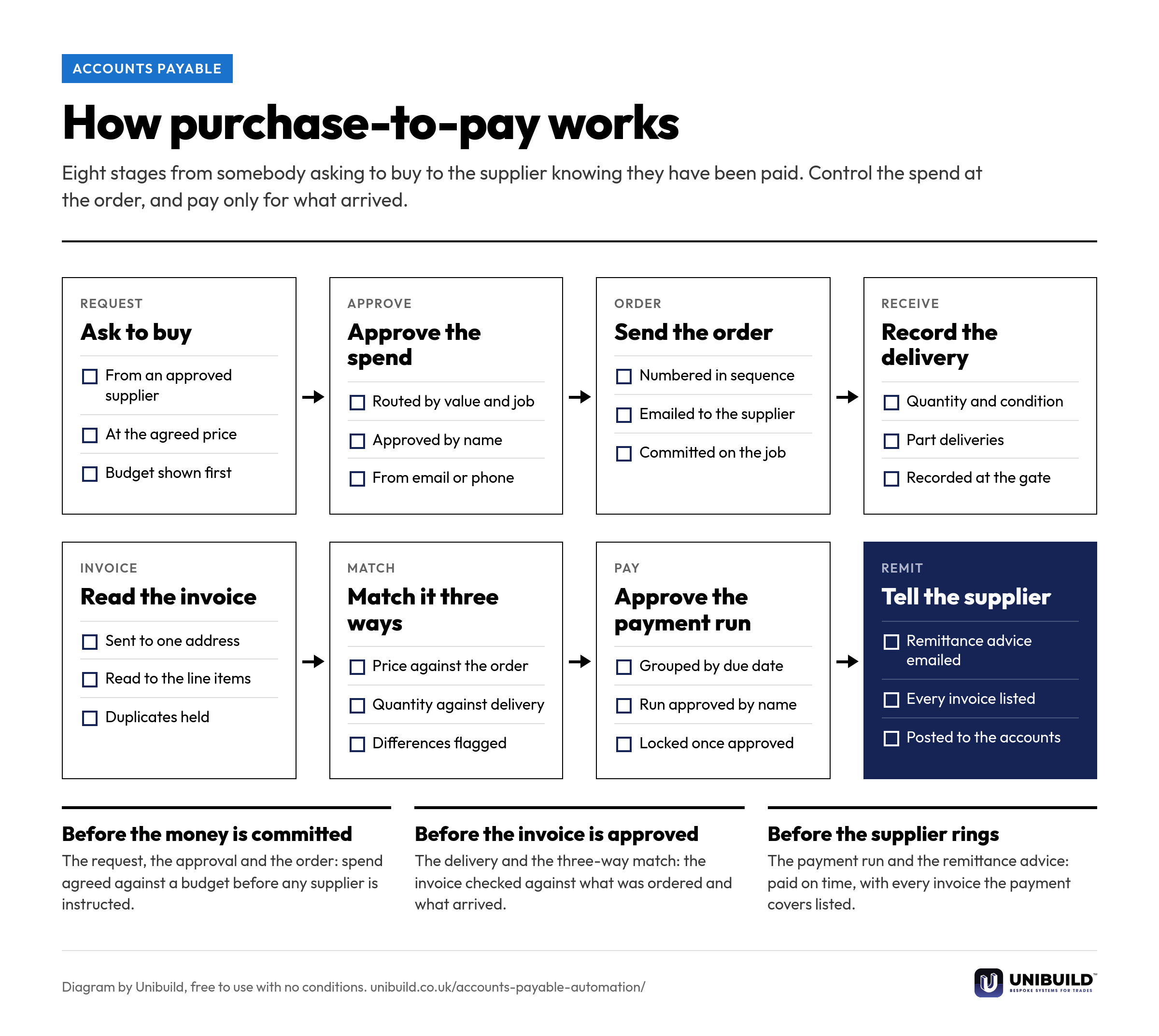
Eight stages from the request to the remittance. Free to use in your own finance procedures.
Standalone accounts payable software is often sold on a metered plan: users, orders and invoices a month, and gigabytes of storage, with a bigger plan when you outgrow it.
| The question | A metered accounts payable plan | Unibuild |
|---|---|---|
| Who can raise and approve | A set number of users, extra users charged | Unlimited users, everyone included |
| Purchase orders a month | A monthly quota, top-ups when exceeded | No quota |
| Supplier invoices a month | A monthly quota of invoices read | No quota |
| Document storage | A few gigabytes, more bought in blocks | Unlimited, synced to your own cloud drive |
| Companies, divisions, suppliers | Capped by plan | As many as you run |
| Approval routes | Configured from the vendor’s options | Built around your process, inside the fee |
| The job behind the invoice | Finance only | Same record as timesheets, job costs and subcontractors |
| The app your site team uses | The vendor’s app | Your own app, under your company’s name |
| The price as you grow | Moves with users and volume | One figure, fixed for three years |
These are the controls finance directors and auditors ask about, and they are on from the first day.

Accounts payable is set up the way your firm already buys and pays. Any change you ask for is built for you, inside the monthly fee. That is how bespoke software works here.
Trades where buying is constant: materials on account, hire, subcontract and hundreds of supplier invoices a month.
Same platform, same login. These are the modules that price the work, buy for it, measure it, claim it and collect it.
The leg of the three-way match most firms do not have: what arrived, counted at the door.
Each stage of purchase-to-pay has a document of its own. These explain them.
A 30-minute live demo of accounts payable in Unibuild, from the request on the phone to the remittance in the supplier’s inbox.
Two minutes. A written figure by email, usually the same working day. Unlimited users, so everyone who raises, receives or approves is included.
UK-built · CDM · CIS · MTD