The job finished in March. The hire did not.
Solved Jobs past their end date with hired items still on them, listed in one place.

Unibuild’s hire management tracks everything a firm has on hire: the item, the supplier, the job, the rate and the hire period. Supplier invoices repeat on that period, and when an item is no longer needed, Unibuild emails the supplier to end the hire.

An example from one job. The suppliers and rates are illustrative; the steps are the ones Unibuild runs.
| Hired item | Rate | Status |
|---|---|---|
| 20kVA generator | £145 a week | Off-hire email sent |
| Tower light | £95 a week | Off-hire email sent |
| Mobile access tower | £120 a week | Moved to the next job |
| Two dehumidifiers | £70 a week | Off-hire email sent |
From the hire nobody ended to the tower hired in while the firm’s own stood in the yard.
Solved Jobs past their end date with hired items still on them, listed in one place.
Solved Unibuild emails the supplier to end the hire, and the date is on the record.
Solved Supplier invoices repeat on the hire period, each against the hire it belongs to.
Solved One register of every hired item, by job, by supplier and by cost.
Solved Hire counts against the job from the day it is ordered.
Solved Owned and hired items on one register, so the yard is checked first.
Every hired item with its supplier, its job, its start date and its rate, beside the equipment the firm owns.
The supplier’s invoices repeat on the hire period, each against the hire, the item and the job it belongs to. Suppliers email them to your firm’s own invoice address, and each is logged as it arrives.
When an item is no longer needed, Unibuild emails the supplier to end the hire, from the hire record.
Hire counts against the job from the day it is ordered, and the running cost of every hire is always in view.
One page lists every job past its end date with hired items still on it, so a forgotten hire is found that week.
An item still needed moves to the next job on the register, with its cost following it, rather than being off-hired and hired again.
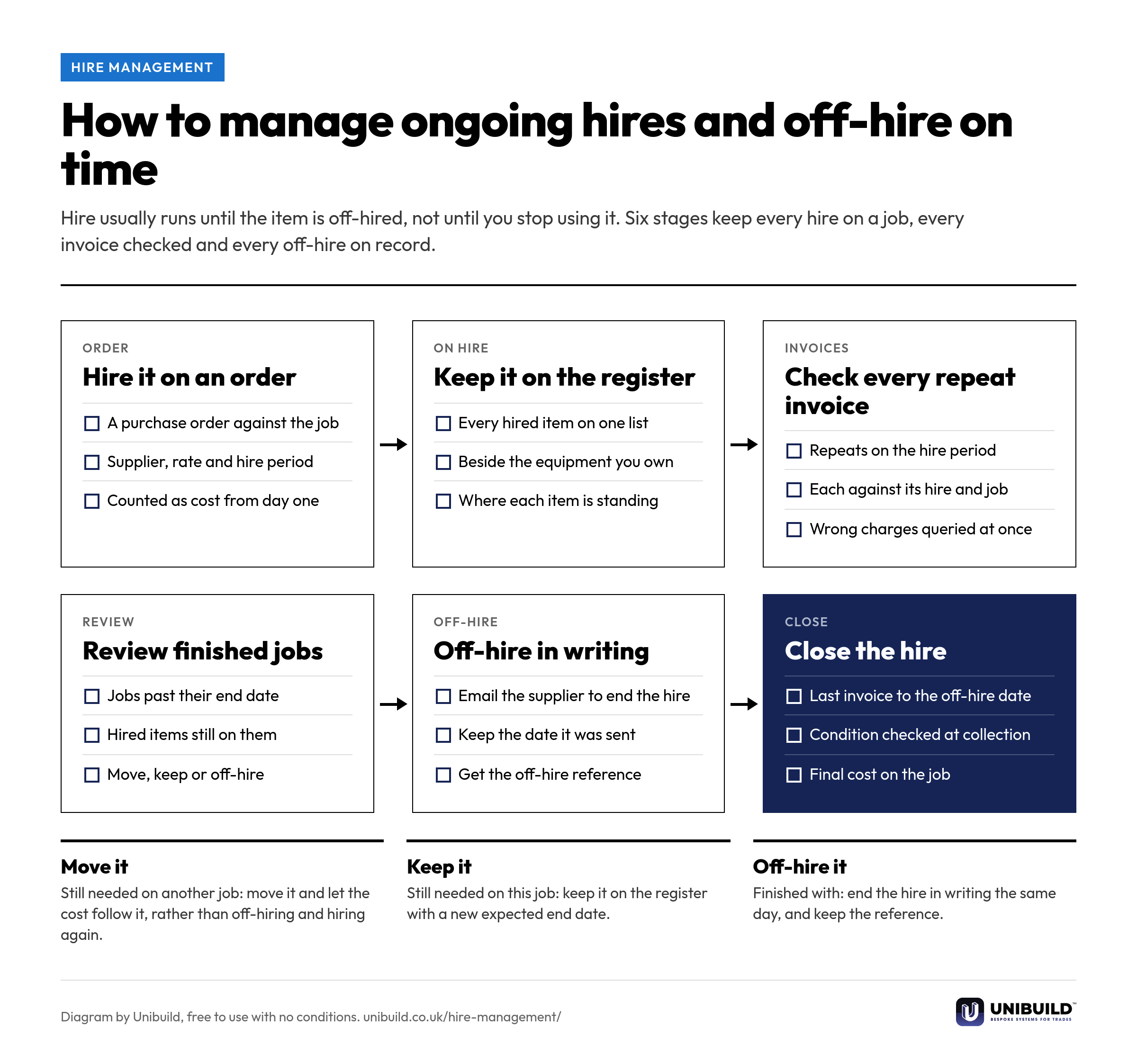
Six stages from the hire order to the final invoice. Free to use in your own procedures.
| The question | Spreadsheet and phone calls | Unibuild |
|---|---|---|
| What is on hire today | Pieced together from invoices | One register, by job and by supplier |
| The cost on the job | When the invoice is processed | From the day the hire is ordered |
| Repeating invoices | Paid because each one is small | Each set against its hire and period |
| Finished jobs | Hire runs on until somebody notices | Listed while the hire is still running |
| The off-hire | A phone call nobody can date | An email to the supplier, dated on the record |
| Equipment the firm owns | Hired in again by mistake | On the same register, checked first |
Hire management is switched on for the firms that need it and set up the way they already hire. Any change you ask for is built for you, inside the monthly fee. That is how bespoke software works here.

Trades that hire in plant, access and site equipment on most jobs.
Same platform, same login. These are the modules that track what you own, when it is next due, and the certificate that proves it.
Why hire charges keep running after the job, and the off-hire reference that stops them.
Hire is one of the easiest costs to lose track of. These go further into the rest of it.
A 30-minute live demo of hire management, from the hire order to the off-hire email.
Two minutes. A written figure by email, usually the same working day. Unlimited users, so every manager who hires for a job is included.
UK-built · CDM · CIS · MTD