Damage management

Damage found, repaired, costed and recharged.

Unibuild’s damage reporting covers plant, equipment, tools, vehicles and anything else on a job, with photographs and video from the phone. The repair and its cost follow, and where the client or main contractor is liable, Unibuild produces the damage report and the invoice.

A line of yellow plant on a site: an excavator, loaders, a roller and a dump truck
One damage record

A distribution unit, a telehandler and the invoice that followed.

An example record for one item on one job. The names and rates are illustrative; the steps are the ones Unibuild runs.

The item
A 400A main distribution unit (MDU), owned by the firm and allocated to a residential job.
Found
By the site electrician on the morning walk round. Door torn off its hinges and two cable glands split. Reported in the staff app with six photographs and a short video.
Cause
Struck by a telehandler working for the main contractor’s groundworks package, recorded on the damage report with the operator’s firm named.
Made safe
A repair was raised from the record, which took the unit out of service. A spare unit was allocated to the job the same day.
Repaired
Door, hinge assembly and glands replaced in the yard, then inspected and tested. Parts, hours and the test result recorded, and the unit returned to service.
Recharged
Marked as rechargeable to the main contractor. Unibuild produced the damage report, with the photographs, and an invoice priced from the firm’s damage schedule of rates.
Example damage invoice to the main contractor, priced from a damage schedule of rates (illustrative rates, net)
Schedule of rates itemAmount
MDU door and hinge assembly, supply and fit (1 at £185.00)£185.00
Cable gland, supply and fit (2 at £24.00)£48.00
Inspection and test after repair (1 at £95.00)£95.00
Replacement unit, delivery and swap on site (1 at £140.00)£140.00
Total£468.00
The record Found, evidenced, repaired and invoiced One record, start to finish
Problems we solve

Eight damage problems. All eight solved.

From the item nobody can place to the recharge that was never invoiced.

8/8Solved in one module
Book a demo →
Solved

Damage found weeks later, with no record of where it happened

What goes wrong

A generator comes back to the yard with a smashed panel. It has been on three jobs since anybody last looked at it closely.

With no record of where it happened, there is nobody to recharge. The repair comes out of the firm’s own margin.

How Unibuild solves it

In Unibuild, damage is reported in the staff app by whoever finds it, on site, against the job and the item.

It can also be flagged on the collection as the item is picked up, so the record starts before anything leaves the site.

  • Reported where it is found
  • Against the job and the item
  • Flagged at collection

See a damage record run from site to invoice in a 30-minute demo.

Solved

A damage claim that comes down to one person’s word

What goes wrong

A recharge is a claim against somebody else’s money. Without photographs taken at the time, the reply is simple: prove it happened on our job.

Photographs on a personal phone rarely reach the office, and the ones that do have no job or item attached to them.

How Unibuild solves it

The photographs and video are taken in the staff app, on the damage record itself, so they arrive in the office with the job and the item already attached.

The damage report carries them, so the client sees the evidence on the same page as the charge.

  • Photographs and video in the app
  • Dated, on the record
  • Carried on the damage report

See a damage record run from site to invoice in a 30-minute demo.

Solved

Your equipment damaged by another contractor on a shared site

What goes wrong

A telehandler clips a distribution unit. A following trade cuts through installed containment. The damage is yours to repair and somebody else’s to pay for.

By the time the office hears, the operator has left the site and the main contractor’s site manager remembers nothing.

How Unibuild solves it

The damage record names who caused it, where that is known, and goes to the office the moment it is saved.

The claim is raised against the client or main contractor from the same record, with the photographs already attached.

  • Cause recorded on site
  • In the office the same day
  • Claimed from the same record

See a damage record run from site to invoice in a 30-minute demo.

Solved

Damaged equipment issued again before it is repaired

What goes wrong

A damaged item sitting in the yard looks like any other item in the yard. Without a status on it, the next picking list sends it straight back out.

Damaged work equipment that goes back into use before it is repaired is a safety problem as well as a cost.

How Unibuild solves it

Raising a repair logs the item out of service, so it cannot be allocated to a job while the repair is open.

Completion records the parts, the hours and the test result, and only then does the item return to service.

  • Out of service on a repair
  • Cannot be allocated meanwhile
  • Back in service on sign-off

See a damage record run from site to invoice in a 30-minute demo.

Solved

Repair costs that never meet the damage that caused them

What goes wrong

Parts go on one order, the fitter’s hours on a timesheet and the outside repairer’s invoice into accounts payable.

Nobody adds them up against the damage, so the true cost of the damage is never known and never recharged.

How Unibuild solves it

In Unibuild, every cost of the repair is collected on the damage record: parts from your spares list, hours worked on it and outside repairers’ invoices.

The total sits on the item’s repair history and on the job where the damage happened.

  • Parts, hours and invoices together
  • On the item’s repair history
  • On the job it happened on

See a damage record run from site to invoice in a 30-minute demo.

Solved

A different price for the same damage every time

What goes wrong

One manager charges a cracked socket at cost. Another adds a call-out. The client notices, and every claim becomes a negotiation.

Pricing each claim by hand also takes time the office rarely has, so small claims are never raised at all.

How Unibuild solves it

Where a firm wants one, it sets a schedule of rates for damage: a rate for each kind of damage or each part, agreed once.

The claim is priced from the schedule automatically, so the same damage costs the client the same amount on every job.

  • One rate for each damage type
  • The same price on every job
  • Small claims worth raising

See a damage record run from site to invoice in a 30-minute demo.

Solved

A recharge agreed on site and forgotten in the office

What goes wrong

The site manager agrees the damage is the client’s. The note goes in a diary, the diary goes in a drawer and the final account closes without it.

Recharges are small, scattered and easy to lose, which is exactly why they add up to real money over a year.

How Unibuild solves it

When damage is marked as rechargeable, Unibuild produces a damage report and an invoice for the client or main contractor.

Both go out on your letterhead, and the invoice is tracked with the rest of your sales invoices until it is paid.

  • Report and invoice produced together
  • On your letterhead
  • Tracked until paid

See a damage record run from site to invoice in a 30-minute demo.

Solved

A damage charge from the hire company, with nobody to pass it to

What goes wrong

On hired plant, the standard CPA hire conditions make loss and damage the hirer’s cost. The hire firm’s photographs from its own yard decide the bill.

If your firm did not cause the damage, the cost should go on to whoever did. Without your own record from site, it stays with you.

How Unibuild solves it

Hired items are recorded on the job the same way as owned ones, with photographs at delivery, during the hire and at collection.

Damage caused by a subcontractor or another trade is recharged to them from the same record.

  • Hired kit on the same record
  • Your own photographs from site
  • Passed on to whoever caused it

See a damage record run from site to invoice in a 30-minute demo.

What it does

Damage reporting and recharges, from the phone to the invoice.

Logged
on the phone

Whoever finds the damage reports it in the staff app, against the item and the job, before anything is moved.

  • Photographs and video
  • Against the item and job
  • Cause and party recorded
  • Flagged at collection too
Evidence from the momentLive

Repair
recorded

A repair raised from the damage takes the item out of service, so it cannot go back out until it is fixed.

  • Out of service on a repair
  • Parts and hours recorded
  • Test result on completion
  • Full repair history kept
Nothing reissued brokenLive

Costs
managed

Every cost of the repair lands on the damage record, and on the job where the damage happened.

  • Parts from your spares list
  • Fitters’ hours
  • Outside repairers’ invoices
  • On the job’s margin
The true cost of damageLive

Damage
report

A damage report is produced from the record, with the photographs, the cause, the repair and the cost on one document.

  • On your letterhead
  • Photographs included
  • Repair and cost shown
  • Kept on the item
The case, already madeLive

Recharge
and invoice

Where the client or main contractor is liable, Unibuild produces the damage report and an invoice for them together.

  • Client or main contractor
  • Subcontractors too
  • Tracked until paid
  • Into your accounts package
Damage recovered, not absorbedLive

Damage
schedule of rates

If you want one, set a rate for each kind of damage or part once, and every claim is priced from it.

  • Optional, set per firm
  • Per client if needed
  • Same damage, same price
  • Fewer arguments
Priced before it is arguedLive
The process

How to recharge damage, from the spot to the invoice.

Six stages, whatever was damaged and whoever caused it. Free to use in your own procedures.
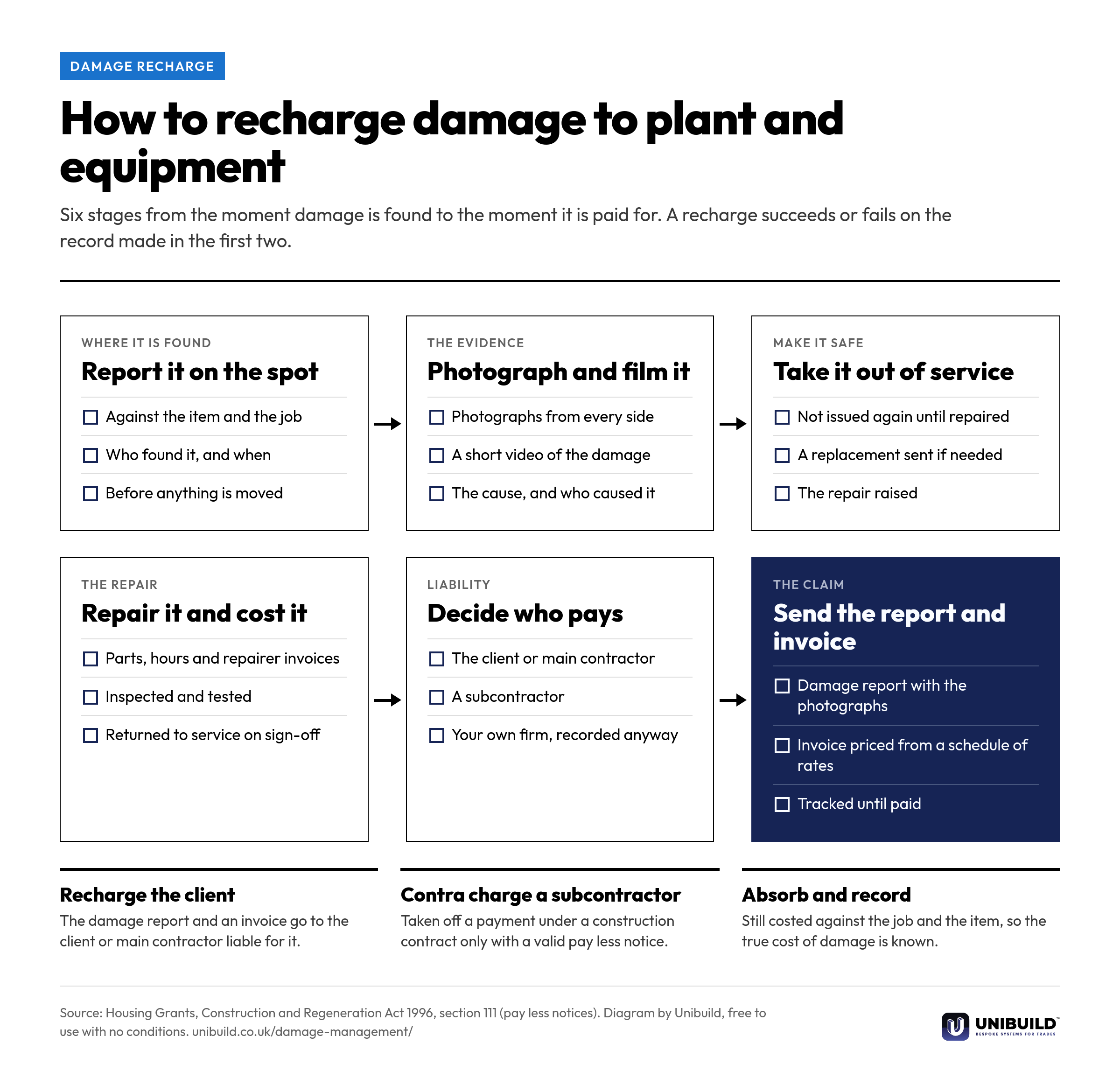
Flow diagram of the six stages of a damage recharge for plant and equipment: report it where it is found, photograph and film it, take it out of service, repair and cost it, decide who pays, and send the damage report and invoice, ending in recharge the client, contra charge a subcontractor, or absorb and record
How to recharge damage to plant and equipment: six stages from the moment damage is found to the invoice.Free to use, copy, change and share, with no conditions. Download the PNG
What can be logged

Anything a job can damage, owned or hired.

Several trades on one site means several ways for things to get broken. Every one of these is logged the same way.

Plant

Excavators and dumpersTelehandlers and rollersAccess platforms and towersOwned or on hire

Temporary power

TransformersMain distribution units (MDUs)Distribution boards and cableGenerators and lighting towers

Tools and equipment

Power toolsTest and survey equipmentPumps, heaters and dehumidifiers

Vehicles

Vans, trucks and carsTrailersAlongside the vehicle checks

Welfare and site set-up

Cabins and welfare unitsToilet blocks and drying roomsFencing and hoarding

Installed work

Containment and fittingsFinishes damaged by a following tradeMaterials stored on site
Paper against the record

A damage claim, handled two ways.

Damage reporting and recharges: paper, email and personal phones compared with Unibuild
The questionPaper, email and personal phonesUnibuild
Where it happenedWorked out later, if at allRecorded against the job when it is found
EvidencePhotographs on somebody’s phonePhotographs and video on the damage record
Who caused itRemembered, or arguedNamed on the record, on site
The damaged itemBack on the next picking listOut of service until the repair is signed off
The costSpread across orders, timesheets and invoicesCollected on the damage record and the job
The price to the clientWorked out each timeFrom your damage schedule of rates
The claimA letter written when somebody has timeDamage report and invoice produced together
PaymentForgotten at the final accountTracked with your sales invoices until paid
Built around your firm

Your damage workflow,
exactly as you run it.

Damage management is set up the way your firm already handles damage, and any change you ask for is built for you. Changes after go-live are included in the monthly fee. That is how bespoke software works here.

Your steps
Who reports, who approves a repair, who decides a recharge and at what value. Each step is set to match your firm.
Your rates
A damage schedule of rates for the whole firm, a different one for a particular client, or none at all and the actual repair cost instead.
Your documents
The damage report and the invoice carry your letterhead and the layout your clients already expect.
Your app
Damage is reported in your own branded staff app, published on the App Store and Google Play under your company’s name and icon.
Three site staff in hard hats at a site office table with a laptop, a tablet and a phone
Questions

Asked by plant, stores
and commercial managers.

Can we record damage to plant and equipment on a phone?
Yes. Whoever finds the damage reports it in the staff app, against the item and the job it happened on, with photographs and video. The record reaches the office as soon as it is saved, so the yard knows before the item comes back.
What should a damage report include?
The item and its identifying number, the job and location, and when and by whom it was found. Photographs and video, what is damaged, the cause and who caused it where known. Then the repair and its cost. Unibuild’s damage report carries all of these on one document.
What can be logged as damaged?
Anything a job can damage: plant, transformers, main distribution units, generators, tools, test equipment, vehicles, welfare units, fencing and installed work. Each is logged the same way, owned or on hire.
Can we recharge damage to the client or main contractor?
Yes. When damage is marked as rechargeable, Unibuild produces a damage report and an invoice for the client or main contractor. The report carries the photographs, the cause, the repair and the cost. The invoice is tracked with your other sales invoices until it is paid.
Can we raise a contra charge or back charge to a subcontractor for damage?
Yes. The damage report and the charge are raised against the subcontractor from the same record. If you are deducting it from a payment under a construction contract, section 111 of the Housing Grants, Construction and Regeneration Act 1996 requires a pay less notice before the final date for payment.
What is a damage schedule of rates, and do we need one?
It is a list of agreed rates for each kind of damage or each part, so every claim is priced the same way. It is optional. Set one for the whole firm or per client, or price each claim from the actual repair cost instead.
How are repair costs tracked?
On the damage record. Parts from your spares list, the hours worked on the repair and outside repairers’ invoices are collected there. The total sits on the item’s repair history and on the job, so it shows in job profitability.
Can a damaged item be sent out again before it is repaired?
No. Raising a repair takes the item out of service, so it cannot be allocated to a job. Completion records the parts, the hours and the test result, and the item returns to service only then.
Does damage reporting cover our vans and trucks?
Yes. Vehicle damage is logged with photographs and video in the same way, and sits beside the daily driver and office vehicle checks in vehicles and fleet. New damage then falls between two dated checks.
Does the damage invoice go into our accounts package?
Yes. Unibuild syncs with QuickBooks, Xero and Sage 50, so the damage invoice reaches your accounts with the rest of your sales invoices. Any other accounts system is synced on request.
Can the damage workflow be changed to suit us?
Yes. The steps, approvals, rates, reports and invoice layout are set to match your firm, and anything else you need around damage is built for you. Changes after go-live are included in the monthly fee.
What software handles damage reporting and recharges for UK contractors?
Unibuild does, as part of its assets and inventory module. Damage to plant, equipment, tools and vehicles is logged with photographs and video, repaired, costed and recharged with a damage report and invoice. Unibuild is bespoke business software for UK trades and specialist contractors, in daily production since 2016.
Is damage management an extra cost?
No. One monthly figure covers everything, including every module, unlimited users and the branded staff app. Damage management is part of it.
Further reading

Damage and off-hire are the two charges a plant owner most often loses. This is the second.

Ask for a quote

Tell us a little about the firm.
We do the rest.

Two minutes. A written figure by email, usually the same working day. Unlimited users, so everyone who reports damage is included.

Headcount
Areas of interest
Get a quote
One figure per firm · For UK firms

Right, let’s talk numbers.

Five things about your business. We work your fee out properly and put it in writing the same working day.

What we build for you

  • Your own portalIn the browser, built around your firm
  • Your own appiOS and Android, under your name
  • Everyday AI includedHeavier AI at cost, nothing added
  • One platformEverything in one place, set up by us

Would you rather see it running first? Book a 30-minute demo

Quotation request